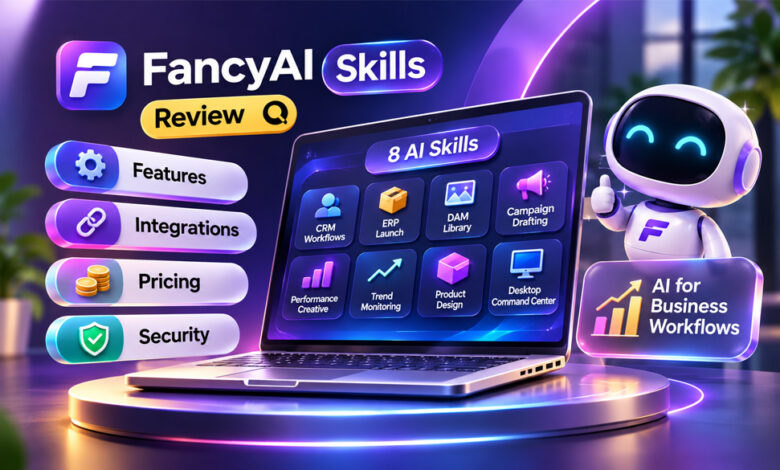

FancyAI Skills are AI tools made for specific business and creative tasks. They can help with customer data, product launches, marketing, ads, digital files, and product design.
Instead of working like a normal AI chatbot, FancyAI aims to connect AI with the tools and data a business already uses. This article explains its eight main skills, integrations, pricing, security, benefits, and limits.
What Are FancyAI Skills?
FancyAI Skills are AI capabilities made for specific jobs. Instead of using one general AI assistant for everything, businesses can choose a skill based on the task they need to complete.
For example, Campaign Drafting helps create marketing ideas and content. CRM Workflows works with customer information. Product Design helps teams explore new design ideas.
FancyAI currently lists eight main skills: CRM Workflows, ERP Launch, DAM Library, Campaign Drafting, Performance Creative, Trend Monitoring, Product Design, and Desktop Command Center.
The main idea is to connect AI with information a company already has. Customer information may be stored in a CRM, product details in an ERP system, and images in a digital asset library.
FancyAI also offers AI Experts and API-based products. A skill is made for a certain task. An AI Expert is a specialized AI agent. An API allows developers to connect AI features with other software.
The features available to each business may depend on its setup, permissions, and connected tools.
How FancyAI Skills Work
FancyAI Skills work by using information from connected business tools and systems.
For example, a company may already have product details and stock information inside its ERP system. A FancyAI workflow could use this information when helping create product or marketing materials.
The same idea can be used with customer records, ad results, images, and other business files.
However, the original information needs to be correct. If a customer record or product detail is wrong, the AI may also produce incorrect results.
This is why human review is still important. Businesses should check facts, permissions, brand rules, and final results before using or publishing AI-generated work.
The 8 FancyAI Skills
FancyAI currently lists eight main skills. Each skill focuses on a different type of business or creative work.
CRM Workflows
CRM stands for customer relationship management. A CRM stores information about customers, purchases, sales, and other activity.
FancyAI’s CRM Workflows skill is made to work with customer data. It may help find customers who are becoming less active and prepare personalized follow-up campaigns.
For example, a business could find customers who have stopped buying and prepare messages to reconnect with them.
Businesses should still check customer data, consent, audience rules, and messages before anything is sent.
ERP Launch
ERP stands for enterprise resource planning. An ERP system may store product details, stock levels, prices, and other business information.
FancyAI’s ERP Launch skill uses this information to support new product launches. It may help create product sheets, marketing materials, and visuals.
This could save time for businesses that regularly launch new products.
However, details such as prices, sizes, stock, and product claims should always be checked before publishing.
DAM Library
DAM means digital asset management. A DAM library stores files such as images, logos, videos, templates, and product photos.
FancyAI’s DAM Library skill helps teams search, organize, and reuse approved files.
This may make it easier to find the correct image or logo. It could also reduce the chance of using an old or incorrect file.
However, the company’s digital library still needs to be well organized. AI cannot fully fix missing, outdated, or badly organized files.
Campaign Drafting
Campaign Drafting helps businesses prepare marketing content.
FancyAI says it can help create campaign briefs, copy ideas, landing-page content, and different ad versions.
It can give marketers a starting point instead of creating everything from zero.
The final content should still be checked and edited. Marketers need to make sure the information is correct and fits the product, audience, and brand.
Performance Creative
Performance Creative uses information from previous ads to help create new ad ideas.
For example, if one headline performs better than others, the team may use that information when testing new ads.
This can be useful for businesses running paid social media campaigns.
However, more clicks do not always mean more sales. Businesses should look at the results that matter to their goals, such as leads, purchases, or profit.
Trend Monitoring
Trend Monitoring helps find topics that are becoming popular on social media.
FancyAI says the skill can use these trends to suggest captions, visuals, and content ideas.
This may help social media teams find new topics more quickly.
However, every popular trend is not right for every business. Teams should check the topic, facts, audience, and brand fit before publishing anything.
Product Design
FancyAI also includes a Product Design skill.
It can help teams explore early design ideas using information such as popular styles, sales patterns, and existing creative work.
Designers may use it to explore patterns, colors, shapes, and other ideas.
AI-generated ideas are not automatically ready to manufacture. Businesses still need to check materials, sizes, costs, technical needs, and intellectual property issues.
Desktop Command Center
The Desktop Command Center brings different FancyAI tools and business systems into one workspace.
It can connect files, business tools, systems, and AI agents. The aim is to reduce the need to move between many different apps.
For example, a business may need product information, approved images, marketing content, and final approval for one campaign. A connected workspace may make these steps easier to manage.
Its usefulness depends on which tools are connected and what permissions FancyAI has.
FancyAI Integrations
FancyAI lists connections with several popular business and creative platforms.
Reported connections include Salesforce, HubSpot, ERP systems, DAM libraries, Meta Ads, TikTok Ads, Instagram, Slack, Gmail, Google Drive, Notion, and Canva.
Salesforce and HubSpot can provide customer information. ERP systems can provide product data. DAM libraries and Google Drive can help with files and images.
Meta Ads, TikTok Ads, and Instagram can support marketing work. Slack, Gmail, and Notion can help with communication, while Canva can support creative tasks.
However, a listed connection does not mean FancyAI can perform every possible action on that platform.
Businesses should check what FancyAI can read, edit, publish, or change before depending on an integration.
FancyAI AI Experts and API
FancyAI also offers AI Experts. These are described as specialized AI agents that can be connected with business workflows.
AI Experts are different from individual FancyAI Skills. A skill focuses on a certain task, while an AI Expert acts as a specialized AI agent.
FancyAI also provides API-based options. APIs allow developers to connect AI features with other apps and business systems.
The available information does not clearly confirm all API prices, limits, or technical requirements.
How to Get Started With FancyAI Skills
It may be better to start with one task instead of trying to automate everything at once.
For example, a business could test FancyAI by creating product-launch content from an existing product record.
The company should first choose the correct source of information. It should also check what FancyAI can read, edit, or change.
Testing with limited data can also help reduce risk.
After FancyAI creates something, a person should check the facts, brand style, missing information, and possible errors.
Businesses should also measure how much time they actually save. Creating something quickly is not useful if employees then spend a long time fixing it.
FancyAI Skills Pricing
The available information gives some pricing details for FancyAI’s model gateway, but full pricing for individual FancyAI Skills is not clear.
Reported gateway credit options include:
- $10
- $25
- $50
- $100
- Custom amount
For this pay-as-you-go gateway option, the reviewed information says balances do not expire and a subscription is not required.
However, these amounts should not be treated as the price of each FancyAI Skill.
Separate prices for CRM Workflows, ERP Launch, Campaign Drafting, and the other desktop skills are not clearly confirmed.
Businesses should check what is included, how credits are used, whether integrations cost extra, and whether there are user limits before paying.
Are FancyAI Skills Free?
A full free plan for all FancyAI Skills is not clearly confirmed.
FancyAI has a reported pay-as-you-go credit option for its model gateway. However, this does not mean every desktop skill is free or uses the same pricing system.
Users should check the current price and access terms for the exact FancyAI product they want to use.
FancyAI Security and Privacy
Security and privacy are important because FancyAI may connect with private business information.
This information could include customer records, internal files, unpublished products, ad information, financial details, or creative assets.
FancyAI promotes a desktop experience that works with local files. However, businesses should still understand how their data is handled.
Before connecting sensitive information, companies should check where files and prompts are processed and stored. They should also check whether business data can be used for AI training.
Permissions are important too. Employees should only have access to the information they need.
Businesses should also check logs, deletion options, approval controls, and other security settings.
Companies handling sensitive or regulated data may want their IT or compliance team to check the setup first.
These are things businesses should check before using the platform. They do not mean FancyAI has a known security problem.
Reliability and Human Review
FancyAI can help make some tasks faster, but AI can still make mistakes.
It may misunderstand product details, use an old image, create an incorrect advertising claim, or work from outdated customer information.
For this reason, important work should always be reviewed.
Customer messages should be checked before sending. Product details and advertising claims should also be checked before publishing.
FancyAI can help with repeated tasks and preparation, but people are still responsible for accuracy, approval, strategy, and final decisions.
Benefits of FancyAI Skills
FancyAI Skills may reduce some repeated manual work.
Businesses can use information that is already stored in their CRM, ERP system, or digital asset library instead of entering it again.
Campaign Drafting may help marketers create first drafts faster. DAM Library may make files easier to find. ERP Launch may make product-launch work easier.
Performance Creative may help teams create new ad ideas from previous results. Trend Monitoring can help find content ideas, while Product Design can support early design work.
These are possible benefits, not guaranteed results. The actual results depend on the company’s data, setup, integrations, and review process.
Limitations of FancyAI Skills
FancyAI Skills depend on good information. Incorrect customer data, product details, or creative files can lead to poor results.
AI-generated work can also contain mistakes, so human review is still needed.
The exact features of every FancyAI integration are not completely clear from the available information. Some connections may also need technical setup or administrator help.
Full desktop pricing is another unclear area. Gateway credit prices should not be treated as prices for every FancyAI product.
Businesses also need to think about privacy, permissions, and data security.
FancyAI may also be more than some small businesses need. If a company only needs AI occasionally, a simpler tool may be enough.
Who Should Use FancyAI Skills?
FancyAI Skills may be useful for businesses that regularly repeat the same tasks and already have organized data.
E-commerce companies that often launch products may find ERP Launch useful. Marketing agencies may benefit from Campaign Drafting and Performance Creative.
Companies with large customer databases may use CRM Workflows. Businesses with many images, videos, logos, and other files may find DAM Library useful.
Product and creative teams may also use Product Design to explore early ideas.
A small business with only occasional AI needs may not need such a connected system.
How to Decide If FancyAI Is Worth It
Businesses should look at three main things: how often they perform the task, how good their data is, and how much review is needed.
A task completed every day may offer more time savings than one completed only a few times each year.
The business data also needs to be accurate. AI cannot provide reliable results if it starts with incorrect information.
Businesses should also count the time needed to review and correct AI work.
For example, if a team creates 40 product listings each month and saves 12 minutes on each one after review, it would save eight hours per month.
This is only an example of how to measure time savings. It is not a confirmed FancyAI result.
Businesses should compare the time saved with the cost, setup work, review time, and possible errors.
Bottom Line
FancyAI Skills are AI capabilities made for specific business and creative tasks. The platform lists eight main skills covering CRM, product launches, digital assets, marketing campaigns, advertising, trends, product design, and connected workflows.
FancyAI also connects with different business tools and offers AI Experts and API-based products.
Some gateway pricing information is available, but complete pricing for the desktop skills is still unclear.
Businesses should check integrations, permissions, security, data quality, and pricing before using FancyAI for important work.
FancyAI Skills may be most useful for businesses with repeated tasks, organized data, and people who can review the final results.
Frequently Asked Questions
What are FancyAI Skills?
FancyAI Skills are AI capabilities made for specific business and creative tasks, including marketing, CRM, product launches, ads, and design.
How many FancyAI Skills are there?
FancyAI’s desktop offering currently lists eight main skills.
What can FancyAI Skills do?
They can help with customer data, product launches, digital assets, marketing campaigns, ads, trends, product design, and business workflows.
What tools does FancyAI integrate with?
Reported connections include Salesforce, HubSpot, Meta Ads, TikTok Ads, Instagram, Slack, Gmail, Google Drive, Notion, Canva, ERP systems, and DAM libraries.
Are FancyAI Skills free?
A full free plan for all FancyAI Skills is not confirmed. Some FancyAI services use a pay-as-you-go credit system.
How much do FancyAI Skills cost?
Reported gateway credits include $10, $25, $50, and $100 options. These are not confirmed prices for each individual FancyAI Skill.
Is FancyAI secure for business use?
Security depends on the setup, permissions, integrations, and how data is handled. Businesses should check these details before connecting sensitive information.
Do FancyAI Skills replace employees?
No. They can help with repeated tasks, drafts, and analysis, but people are still needed to check the work and make final decisions.
SparkPressFusion.com Review: Is It Safe, Useful, and Reliable?
Alaikas.com Review: Features, Safety, Privacy, and How It Works