
Mixed floors create a particular kind of mess. Hardwood collects fine dust, carpet traps pet hair deep in the fibers, and tile grout catches crumbs that a quick sweep would miss. The robot vacuum takes care of all that while you’re doing something else. What it can’t do is maintain itself.
Weak suction, weird navigation, a strange smell coming off the mop pad. These are common signs that robot vacuum maintenance has fallen behind. Almost every time, the root cause is a part that went too long without being cleaned or replaced. Not a defect. Just neglect.
Below is a maintenance checklist organized by frequency: what to check after each run, what to handle weekly, and what needs attention less often but still matters. It covers the dustbin, brush roll, washable components, filters, sensors, wheels, dock station, and mop care. Most of it applies to robot vacuums for carpet and hard-floor combos, though part names and removal steps vary between models. Your manual is the tiebreaker when something here doesn’t match.
| Frequency | Parts to check |
| After every run | Dustbin, brush roll, mop pad |
| Weekly | Side brushes, filter, sensors, wheels |
| Every few cycles | Dock, dirty-water tank, wash tray |
| Per manual | Filter and consumable replacement |
Dustbin and brush roll: what to check after every run
The dustbin fills up faster than you’d think, especially in homes with pets. After each cleaning cycle, pull it out and check. Robots without an auto-empty dock need the bin dumped every time, or close to it. A bin that’s even half-full restricts airflow enough to weaken carpet suction. Ten seconds of checking now saves a full repeat cycle later.
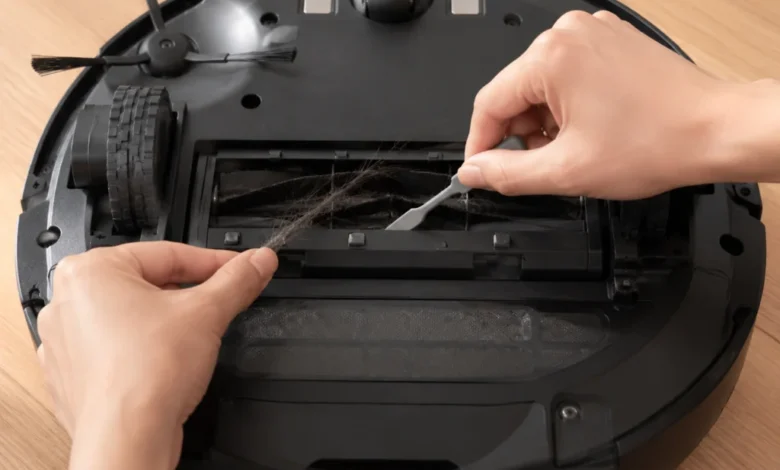
Wondering how to clean robot vacuum brushes? The brush roll deserves a weekly look. Flip the robot over and inspect the main roller. Hair, thread, and carpet fibers wrap tightly around the bristles or rubber fins, and in a household with a dog or anyone with long hair, buildup can be visible after just two or three runs. A cleaning tool usually ships with the robot. Scissors work fine too. Cut along the roll’s length and pull strands free.
While the robot’s upside down, take a look at the side brushes. Bristles that splay outward or look frayed won’t push debris toward the main brush the way they’re supposed to. A side brush that spins freely but doesn’t actually sweep anything is past its useful life.
How to wash and dry removable parts without damage
Dustbins, mop pads, and some pre-filters can usually be removed and rinsed. Not every part is washable, though, and getting this wrong causes real damage. According to the EPA, HEPA filters must capture at least 99.97% of particles down to 0.3 microns. A non-washable HEPA filter, for example, loses its structure the moment water hits it. Fine particles pass straight through on the next cycle. Check the manual before rinsing anything.
For parts that are labeled washable, the routine is straightforward. Remove them, rinse under running water, and skip the dish soap or chemical cleaners unless the manual says otherwise. Cleaning product residue can coat internal sensors or break down filter material over time. The American Lung Association recommends avoiding fragranced or chemical-heavy cleaning products around air filtration components.
Drying is where a lot of people cut corners. A damp mop pad or dustbin goes back into the dock, the dock seals up, and now you’ve got a warm, closed box. Mold loves that. The musty smell that sometimes hits you mid-cleaning run usually traces back to exactly this: a part that wasn’t fully dry before it went back in.
Leave washed parts standing upright near a fan, or somewhere with decent airflow. Not back in the dock. Not in a drawer. In open air. Wait until there’s zero moisture left.
Filter, sensor, and wheel maintenance most people skip
Dust builds on the filter surface gradually, and the drop in airflow isn’t always obvious until suction is noticeably weaker. Tap the filter against a hard surface or brush it with the dry cleaning tool that came with the robot. Don’t rinse it unless your manual explicitly calls the filter washable. Most pleated HEPA-style filters can’t survive water.
Replace the filter on the schedule your manual recommends. By the time you actually feel weaker suction, the motor’s been straining against that clogged filter for a while already.
Sensors don’t break often, but they do get dusty, and dusty sensors cause strange behavior. The cliff sensors on the bottom of the robot are a good example. Their job is stair detection. When they’re covered in a film of dust, the robot reads dark rugs as drop-offs and freezes up, or it stops mid-run in the middle of a room for no reason you can see. Quick fix: dry microfiber cloth, ten seconds. Same goes for the LiDAR turret and any front-facing camera. Dust and fingerprints on those throw off the map.
Wheels are a different kind of problem. Hair and thread work their way around the axle where the wheel meets the body, and the buildup isn’t always visible from the outside. Check the two drive wheels and the front caster wheel. Tweezers help for pulling tangled strands out. Press each drive wheel in and let go. If one feels stiff or doesn’t bounce back like the other, something’s jammed further in than you can see. The charging contacts on the underside are worth a wipe too. When those get coated in dust, the robot either fails to dock or sits on the charger all night and still isn’t at 100% in the morning.
Dock and mop-care routine
Docking stations do more work than they get credit for, and they need upkeep too.
If your dock auto-empties, check the dust bag. Give it a squeeze. Feels solid, like a packed pillow? Time to swap it. Also look at the suction port where the robot connects to the dock. Dust clumps and stray hairs collect around that opening, and once it’s partially blocked, the emptying cycle can’t fully clear the robot’s onboard bin. You end up with a half-empty dustbin and wonder why suction seems off.
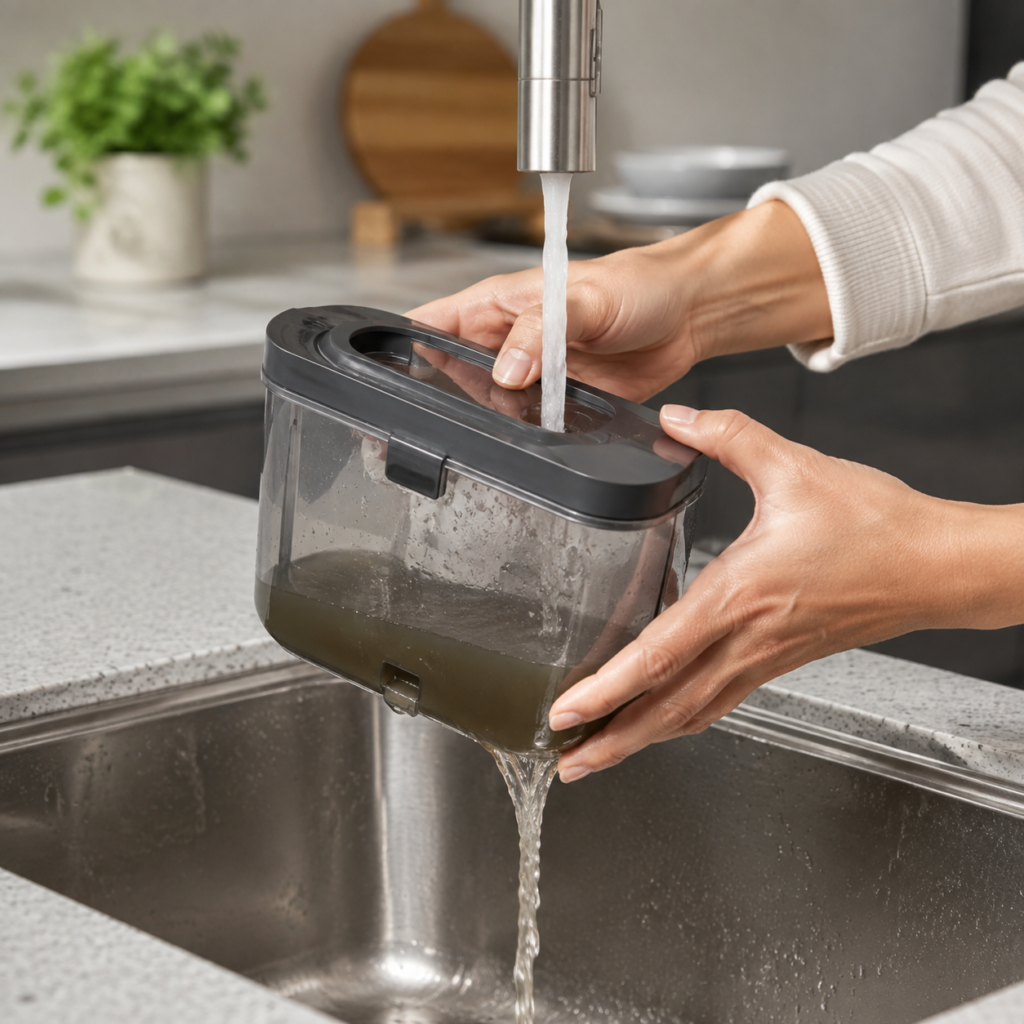
Self-washing docks bring their own maintenance tasks. Drain the dirty-water tank after every few cycles. Leaving it for days is how you get that sour smell on the mop pad. Nobody wants their freshly mopped floor smelling like old water. The wash tray or basin inside the dock collects soap residue and grime too, so give that a wipe when you’re already in there.
For docks with an automatic detergent dispenser, top off the clean-water reservoir and use the manufacturer’s recommended solution. Cheaper third-party detergent is tempting, but some of them foam up more than the dock can handle, or leave a film that slowly clogs the internal tubing. Replacing a clogged pump line is a bigger hassle than just buying the right detergent.
One thing that catches people off guard: even docks that wash the mop after every run don’t get everything. Stains that have dried into the mop fibers, or residue from sticky spills, won’t come out in an automated wash cycle. Every couple of weeks, pull the mop pad or roller out yourself and rinse it under running water. Let it air-dry completely before putting it back.
Airflow around the dock matters for drying, too. Pushing the station into a tight corner where air barely circulates makes it harder to dry mop pads between cycles, and that circles back to the mold and odor issue from the earlier section.
How often to clean each part based on your household
How often you need to handle robot vacuum cleaner maintenance depends on the household.
Two shedding dogs on a mix of hardwood and carpet? Expect to check the brush roll after every other run and keep a closer eye on the dustbin or dust bag. A two-person home on mostly tile with no pets can go longer between checks without running into problems. The variable that matters most is cleaning load, not the calendar.
Some of these tasks get easier when the robot itself is designed to handle them. The eufy Robot Vacuum Omni E28, for instance, has DuoSpiral™ Detangle Brushes that resist hair buildup on the roll. That alone cuts down on the most common weekly chore. The All-in-One Station takes over several other items on this list: it self-empties, washes the HydroJet™ Self-Cleaning Roller Mop, runs hot-air drying at 95 to 122 degrees Fahrenheit, dispenses detergent automatically, and refills its own clean-water tank. For a busy household running the robot daily on mixed floors, those features shift a lot of the manual tasks in this checklist to automatic ones. It doesn’t eliminate maintenance entirely, but it changes the cadence.
Whatever robot you own, a weekly once-over helps more than you’d expect. Pick a day. Flip it over, look at the brush roll, give the filter a tap, run a cloth over the sensors and wheels, check the dock. Some people stick a note on the dock as a reminder. The point isn’t perfection. It’s noticing a clogged filter before the motor starts overheating, or catching hair wrapped around the brush roll before it gouges the hardwood.
When to stop troubleshooting and contact support
Sometimes you clean every sensor, restart the robot, and the same error code shows up again. At that point, the problem probably isn’t dust or debris. Firmware bugs and hardware faults look the same from the outside, and no amount of wiping sensors will fix either one.
Navigation is another area where repeated failures signal something deeper. If the robot can’t find its dock after three or four tries, or it keeps mapping the same room wrong, the issue has moved past what maintenance can solve.
Grinding or clicking sounds from the brush motor or drive wheels are harder to diagnose on your own, especially when there’s no visible debris causing the noise. That usually points to internal wear. Battery life that’s dropped noticeably compared to the first few months? Also worth flagging. A full charge that barely covers half the house used to be enough for the whole floor plan. That kind of decline won’t reverse with a cleaning session.
Before calling support, write down the model number and the firmware version (both are in the app). Got an error code on screen? Write that down too. Sounds basic, but showing up with all of that saves you from the first ten minutes of back-and-forth where they’d ask for it anyway. If you can also mention what you’ve already tried (cleaned sensors, restarted, checked the brush roll), they’ll skip past the generic troubleshooting script and get to the actual issue faster.
Conclusion
Brush roll and dustbin upkeep matter the most, followed by filters, sensors, and wheels. Dock and mop maintenance rounds out the list, especially for homes that run the robot daily.
Pet owners and anyone with mixed flooring will end up on the more frequent end of every interval. How frequent depends on the model. Manufacturers don’t all use the same part names or replacement timelines, so the manual stays relevant long after setup day. Spending a few minutes each week on robot vacuum maintenance is a lot cheaper than replacing a motor or buying a new robot because something small got ignored for too long.