What MOQ Really Means When Ordering Custom Webbing and Elastic From Overseas Manufacturers

If you order custom webbing or elastic from a foreign manufacturer, you may see the term MOQ. It is important to understand this term before ordering. MOQ can affect your budget, your order size, and your total expenditure.
Many buyers would like to order a small amount of products when they work with a new supplier. But some manufacturers ask customers to order a minimum amount, and this can be particularly confusing for small businesses.
We will explain in this article what MOQ means, why manufacturers use it, and how you can choose the right order size for your company.
What Does MOQ Mean?
MOQ means Minimum Order Quantity. This is the lowest number of products one manufacturer will accept in one order.
A supplier can create an MOQ of 1,000 meters for customized elastic. This means you have to place your order for at least 1,000 meters.
While others require bigger orders, some manufacturers can accept smaller orders. MOQ often depends on the product type, the design, the material, and the method of production.
Why Do Overseas Manufacturers Set an MOQ?
Manufacturers have set up MOQ for a number of reasons, and the manufacture of tailor-made products takes time, materials, workers, and machines. Even a small order can require many of the same steps as a big order.
Here are some of the common reasons why suppliers establish minimum order quantities.
1. Material Costs
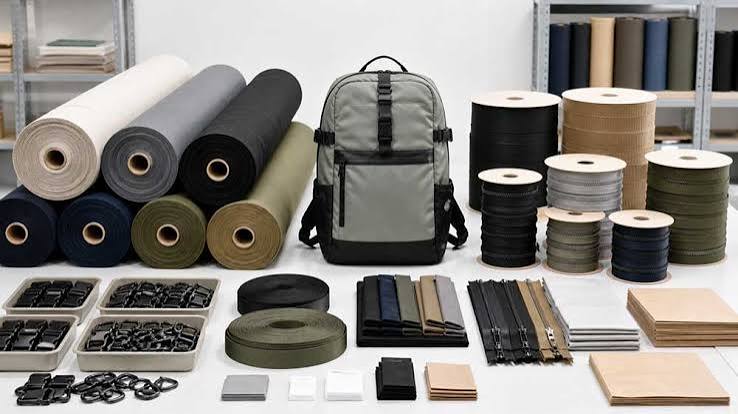
Manufacturers need raw materials to make webbing and elastic. Such materials may be polyester, nylon, cotton, rubber, and other fibers.
Suppliers often have to buy these materials in quantities. If a small quantity is ordered by the buyer, only the price of the material may be higher per unit.
2. Machine Setup Costs
Custom webbing and elasticity may require special machines for fabric, knitting, cutting, or printing.
It takes time and money to create these machines. Workers can also have to adjust machine settings for a new design, width, or color.
If the order is too small, these setup costs can be more expensive per meter. Over more products, a MOQ helps spread these costs.
3. Custom Designs
Many businesses need webbing or elastic in special colors, sizes, patterns, or widths. These products may not be used as standard products.
A custom order may need additional work to begin before production. Manufacturers may therefore set higher MOQ values for special designs than for regular products.
How MOQ Affects Your Budget
MOQ can have direct impacts on your business budget. A higher minimum order means you need more money in the beginning.
Think, for example, that a supplier that offers MOQ with 2,000 meters of custom elastic at $0.50 per meter is available. The product fee would be $1,000 prior to shipping, taxes, and other charges.
If your business only needed 500 metres, the order for 2,000 metres could add more to the stock. Also, you’ll need enough space to store it.
MOQ for Custom Webbing and Elastic
MOQ may differ in terms of webbing and elastic products.
For example, standard webbing may be available in common colors and widths. Custom webbing with a special logo, pattern, or color can require a bigger order.
Elastic products can also have MOQs. Minimum quantities may depend on material, elongation, width, color, and intended use.
If you are looking for a reliable Lightspot custom webbing supplier, discuss your product requirements and start ordering sizes before production. Clear communication can help you understand the options and choose products that match your business needs.
How to Choose the Right MOQ
Choosing the right MOQ can help you manage costs and prevent waste. Here’s some simple advice.
Know Your Product Needs
Before contacting a manufacturer, decide how many straps or elastic you need. Think about your current orders and how you can use the material in the coming months.
This will help you avoid buying too many shares.
Ask About Small Orders
If you are a small company, ask your supplier if you can accept a lower MOQ. Some manufacturers may offer smaller orders for testing to new customers.
Prices per meter can be higher, but a small order could help you test the product before you spend more money.
Compare More Than One Supplier
Do not select a supplier based on the lowest price only. Compare MOQ, product quality, time of manufacture, shipping cost, and communication.
A supplier that has a somewhat higher price for the product can provide better or more appropriate requisitioning terms.
Check Samples Before Ordering
If necessary, request samples before placing a large order. Samples allow you to check material, color, width, strength, and elongation.
This step is particularly useful when ordering custom products from another country. It can reduce the risk of getting products that fail to meet your needs.
Common MOQ Mistakes to Avoid
A common mistake is ordering too much material only to get a lower price. Additional stock can clog storage space, and your business may require money from elsewhere.
Another mistake is to ignore the shipping costs. A large order may have a lower price per meter, but a higher shipping cost overall.
Some buyers will also forget to check product quality before placing an order in bulk. Always check the sample and confirm the product details before production starts.
Finally, don’t assume each manufacturer has the same MOQ. Ask each supplier for clear information on their order rules.
Conclusion
MOQ is a crucial part of ordering custom webbing and elastics with foreign manufacturers. It tells you the minimum amount you need to buy and helps you understand the production requirements of the supplier.
Check the MOQ before ordering, compare prices, check samples, and calculate your total cost. If the minimum quantity is too high, ask for smaller orders or generic options of products.
With careful planning and precise communication, you can find an appropriate supplier, manage your budget, and order the correct amount of custom webbing and elasticity for your business.