
Work, school, gaming, driving, and phone use can all keep the body in one position for long stretches. A few practical adjustments can make those routines more comfortable, while regular movement gives muscles and joints a chance to adapt to varying loads throughout the day. Families who are building healthier habits across all ages may also look for services that include pediatric care as part of a broader focus on mobility and wellness. Better back comfort rarely comes from one expensive chair, one stretch, or a perfectly upright pose. It is usually the result of several manageable habits: setting up the workspace to fit the person, moving before stiffness becomes intense, and paying attention to symptoms that do not improve.
Why Desk Habits Matter
Many daily activities now happen in front of a screen. When the head stays turned toward a second monitor, the arms repeatedly reach for a mouse, or the lower back lacks support, the body may become fatigued over time. Discomfort is not always proof that someone has used one “bad” posture. More often, it can reflect staying in any one position for too long without enough movement. Regular physical activity supports more than back comfort. It can contribute to sleep, mood, balance, and long-term health, and the health benefits of physical activity for adults apply even when a person starts with small, realistic changes to a sedentary routine.
Build A More Comfortable Workstation
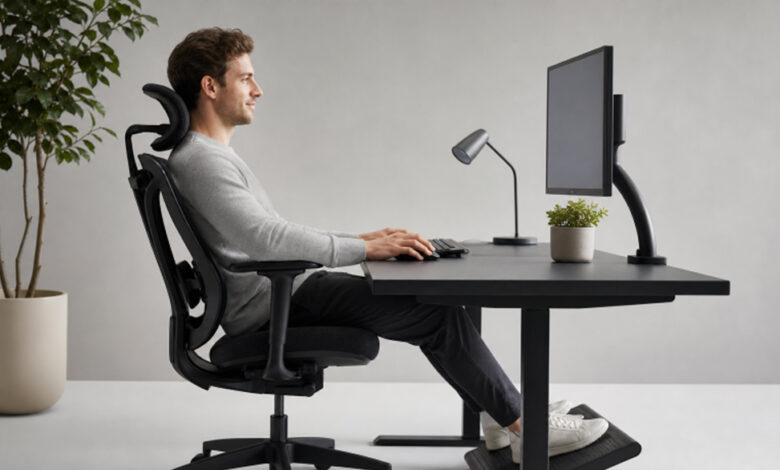
The most useful workstation is adjustable. The goal is not to lock the body into a rigid position. Instead, arrange the chair, screen, and input devices so that supported, relaxed positions are easier to find and change.
Chair And Lower Back Support
- Place the hips fully back in the chair so the backrest can provide support.
- Adjust the seat height so both feet rest on the floor or on a stable footrest.
- Keep the hips level with or slightly higher than the knees if that feels comfortable.
- Use a small cushion or rolled towel behind the lower back if there is an uncomfortable gap between the chair and waist.
- Keep armrests low enough that the shoulders can remain relaxed.
Monitor, Keyboard, And Mouse Position
Put the main monitor directly in front of the body, with the top of the screen near eye level for many users. Position it at a distance that allows comfortable reading without leaning forward. Keep the keyboard and mouse close enough that the elbows stay near the sides rather than reaching outward. If a laptop screen needs to be raised, use an external keyboard and mouse so the hands do not have to work at shoulder height. OSHA’s computer workstation guidance offers practical examples of screen placement, foot support, and neutral working positions.
Why Changing Position Beats Holding One Pose
Even a well-supported position can become tiring when held for too long. Rather than trying to maintain one “perfect” posture, think in terms of variety. Shift in the chair, stand while reviewing a document, walk to refill a water bottle, or change tasks when possible. A standing desk can be useful because it offers an alternative, but standing still for hours can also lead to fatigue. A helpful rule is to change position before discomfort becomes strong. Small adjustments made regularly are often easier to maintain than waiting until the neck, shoulders, hips, or lower back feel very stiff.
A Simple Movement-Break Plan
Movement breaks do not need to become lengthy workouts or disrupt a busy schedule. Use this simple pattern as a starting point and adjust it to fit meetings, classes, commuting, and physical ability.
- Every 30 to 60 Minutes: Stand up, take a few steps, or move gently for a minute or two.
- During Phone Calls: Walk or stand when the task does not require sitting at the screen.
- At Lunch: Take a short walk, even if it is only around the building or block.
- After A Long Commute: Gently move the neck, shoulders, hips, ankles, and upper back.
- At The End Of The Day: Use light activity, such as walking or easy household tasks, to transition away from prolonged sitting.
Gentle Exercises For Daily Comfort
For generally healthy adults, slow and controlled movements can be a useful way to break up a sedentary day. None of these exercises should cause sharp pain, increasing numbness, dizziness, or symptoms that travel into an arm or leg.
- Shoulder Rolls: Roll both shoulders backward slowly, then relax them.
- Chin Tucks: Draw the head gently backward without tipping the chin up or down.
- Chest Opener: Rest the hands behind the body or on a doorway and open the front of the chest softly.
- Seated Hip Stretch: Cross one ankle over the opposite knee and lean forward only as far as feels comfortable.
- Wall Slides: Stand with the back near a wall and slide the arms upward through a comfortable range.
- Easy Walking: Take a relaxed walk to restore movement after extended sitting.
Core Strength And Spinal Support
Core strength is not limited to visible abdominal muscles. The muscles of the trunk, hips, pelvis, and back work together during walking, standing, lifting, and changing direction. Beginner-friendly options such as bridges, bird dogs, dead bugs, and supported planks can build control when performed with steady breathing and good form. Start with an amount that feels manageable, and prioritize quality over high repetitions.
Common Posture Myths To Avoid
- Myth: You must sit perfectly straight all day.
- Fact: Supported alignment and frequent movement are more realistic goals.
- Myth: A posture device permanently fixes posture on its own.
- Fact: Reminder tools may be helpful, but movement, strength, and daily habits still matter.
- Myth: Stretching must feel intense to work.
- Fact: Gentle, controlled movement is usually more appropriate than forcing a painful stretch.
- Myth: Back comfort requires a complete office makeover.
- Fact: Adjusting screen height, chair support, and break habits can be useful first steps.
Daily Habits Outside The Office
Workstation habits are only one part of the picture. Keep objects close to the body when lifting, avoid twisting while carrying a load, and use both backpack straps when possible. Raise a phone or tablet closer to eye level during longer sessions instead of repeatedly bending the neck. Choose sleep positions and pillow support that keep the neck comfortable, and build new exercise habits gradually rather than making sudden, intense changes.
When To Seek Professional Advice
Desk-related stiffness may improve with sensible changes to movement and setup, but some symptoms may require more attention. Seek medical guidance if pain begins after a fall, collision, or other injury; if numbness, tingling, or weakness develops; if pain travels into an arm or leg; or if symptoms interfere with sleep, walking, work, or normal daily tasks. Persistent discomfort or uncertainty about its cause also deserves professional evaluation.
Common Questions
What Is The Best Sitting Posture?
The best sitting posture is one that feels supported, balanced, and easy to change. Keep the head generally over the torso, allow the shoulders to relax, and give the feet stable support.
How Often Should Someone Take A Break From Sitting?
Brief movement every 30 to 60 minutes is a practical starting point. The exact schedule can vary, but frequent short breaks are often easier to maintain than waiting until significant stiffness sets in.
Can Walking Help After Long Desk Work?
Gentle walking changes the demands on the hips, legs, and trunk while interrupting prolonged stillness. The pace and distance can be adapted to a person’s comfort and fitness level.
Do Standing Desks Solve Posture Problems?
Standing desks provide another working position, but they are not a complete solution. Alternating between sitting, standing, and walking is generally more practical than relying on either sitting or standing alone.
Conclusion
Better back comfort is usually built through small choices repeated consistently. Set up the workspace to reduce unnecessary strain, change position throughout the day, incorporate gentle movement and gradual strength work, and respond promptly when symptoms persist or are concerning. Take short breaks from prolonged sitting, adjust screens and frequently used items so they are easy to reach, and use controlled movements when lifting or carrying everyday objects. Adequate sleep and recovery can also be part of a sustainable routine, particularly during busy or physically demanding periods. Pay attention to patterns that make discomfort better or worse and adjust activities when needed. The goal is not perfect posture or a complicated exercise plan. It is a body that can move, adjust, and recover during daily life while recognizing when professional guidance may be appropriate.