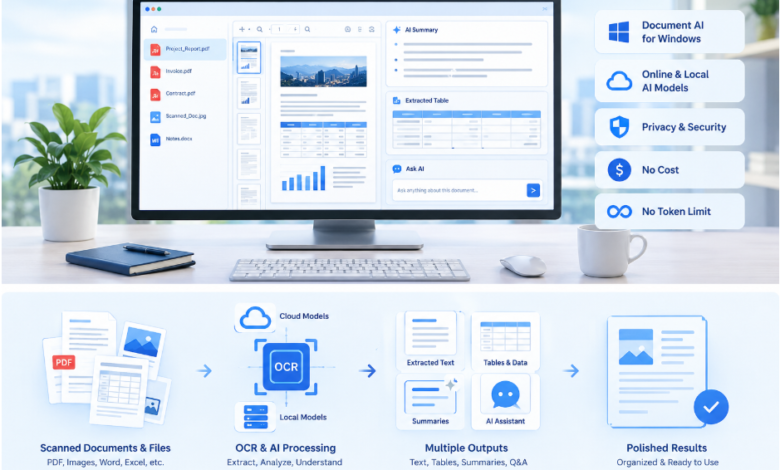

Managing documents can take hours when you need to review lengthy reports, extract information from scanned files, compare data, or prepare organized summaries. Switching between different applications for every task can make the process even slower. iBoomto AI offers a practical approach by combining free online document tools with a Windows-based AI document agent, helping users handle individual tasks and more complex workflows in one convenient environment.
What Is iBoomto AI?
iBoomto is a document AI platform designed to simplify everyday document processing for students, researchers, professionals, and businesses. Its online tools help users complete focused tasks, such as summarizing PDFs, converting files, and extracting tables. For more advanced work, the Windows application provides an AI document agent that can help users analyze files, organize information, and create useful outputs.
One important advantage is flexibility. Users can start with a quick online tool without installing software or use the Windows application when their work involves multiple files and several connected steps. This approach makes document processing easier to manage without relying on a collection of separate applications.
Free Online Tools for Everyday Document Tasks
Not every document task requires a complete desktop workflow. Sometimes, you simply need to understand a long report, convert a file into an editable format, or extract information from a table. iBoomto provides online tools for these specific needs.
For example, its AI PDF summarizer helps turn lengthy documents into concise summaries, making it easier to identify important points before reading the complete file. The PDF to Markdown tool converts document content into a structured format that users can edit, reuse, and organize. Meanwhile, the PDF Table Extractor helps capture information from tables for further analysis.
These focused tools can save time when working with research papers, business reports, educational materials, and other documents. Users can select the tool that matches their immediate requirement instead of installing a complete desktop application for a simple task.
A Windows AI Agent for Broader Workflows
When document processing involves several steps, a dedicated desktop application can offer a more connected experience. iBoomto AI is designed for Windows PCs, bringing document understanding, AI-assisted analysis, PDF editing, and document creation into one workspace.
Users can provide files and describe the outcome they need using natural-language instructions. Depending on the task, the agent can summarize information, extract important details, compare documents, identify inconsistencies, and help prepare structured reports.
This is particularly useful for professionals who regularly handle contracts, invoices, research materials, meeting notes, and business proposals. Instead of manually repeating the same process across several files, they can organize related tasks within a single workflow.
Support for Online and Local AI Models
Different document tasks have different processing requirements. Some benefit from cloud-based AI models, while others may be better suited to local processing.
iBoomto’s Windows application supports online and local AI model options, allowing users to choose an approach that fits their workflow and available configuration. Online models can provide AI capabilities through supported services, while compatible local models can help users process suitable tasks on their own computers.
Local processing can be valuable when users want greater control over their documents or prefer to keep certain information on their devices. However, the exact processing location depends on the selected model and feature. Users should check the application’s settings and model requirements before handling confidential information.
OCR and Multiple-File Processing
Scanned documents create a common challenge because their contents may be stored as images rather than searchable text. Optical character recognition, commonly called OCR, helps convert text in scanned pages into machine-readable content.
With OCR-supported document workflows, users can extract information from scanned PDFs and images, making the content easier to search, review, and analyze. Layout-aware processing can also help preserve the relationships between headings, paragraphs, and tables.
Another useful capability is multi-file processing. Rather than opening every document individually, users can work with several related files to compare information, locate important details, and prepare consolidated summaries. This can be helpful when reviewing research papers, comparing report versions, or gathering information from multiple business documents.
Privacy, Security, and Cost Considerations
Privacy is an important consideration whenever AI tools process personal or business documents. iBoomto emphasizes local file handling and privacy-conscious processing. Its Windows application keeps original files on the user’s device, although some AI-assisted operations may transmit the content required for processing to an external model or service.
Users should therefore review the data-handling details of their chosen workflow, particularly when working with financial records, contracts, or confidential company information.
Cost is another consideration. iBoomto offers free online document tools and free access to selected desktop capabilities. Its no-token-limit positioning is useful for people who want to work without tracking every prompt as a separate token expense. However, access to particular models, advanced capabilities, or higher-volume processing may depend on the applicable plan. Checking the current terms helps users understand which features are available without charge.
Who Can Benefit from iBoomto AI?
Students can use document summaries to review study materials, while researchers can extract important findings from papers and organize information from multiple sources. Office professionals can use AI-assisted document workflows to review reports, compare files, and prepare summaries. Small businesses can also benefit from reducing repetitive document tasks without maintaining a complicated collection of software tools.
Conclusion
iBoomto AI brings together focused online document tools and a Windows AI document agent for different levels of document processing. Its combination of OCR, multi-file workflows, online and local model support, and privacy-focused design offers a flexible way to manage everyday documents.
Whether the goal is to summarize one PDF or organize information from several files, users can choose a workflow that fits the task. Starting with a free online tool and moving to the Windows application when more advanced processing is needed can make document work simpler, more organized, and more efficient.