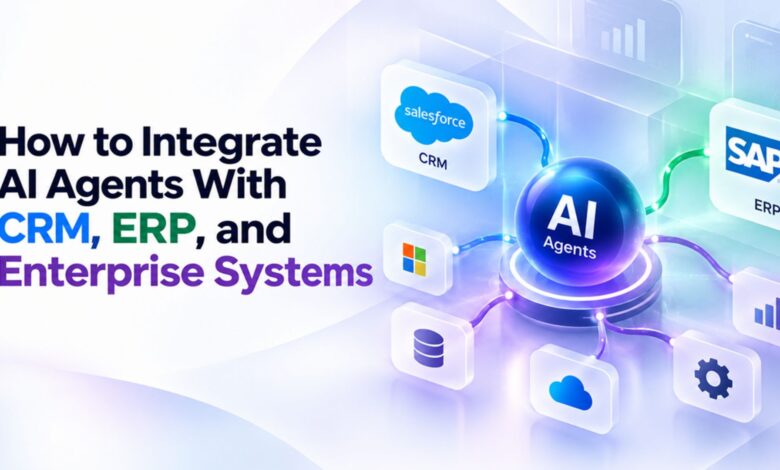
How to Integrate AI Agents With CRM, ERP, and Enterprise Systems

A sales agent updates a deal stage inside the CRM the moment a contract gets signed. The ERP system, sitting one step away, still shows that deal as open three days later. Finance plans around a number that was already wrong the day it got pulled.
This is not an unusual glitch buried in edge-case documentation. It is what happens when an agent connects to one system well and everything else poorly. An AI agent development company building for enterprise clients sees this pattern surface constantly, usually right after a promising pilot expands into real production use.
Integration is not a technical detail tucked behind the interesting part of an agent build. It is the part that decides whether an agent actually helps a business or just adds one more system nobody fully trusts.
This article walks through what connecting agents to CRM, ERP, and enterprise systems actually requires. It covers where teams underestimate the work, and what separates a connection that holds up from one that breaks under large volume. Real AI agent development services treat integration as the foundation, not an afterthought.
Why Integration Determines Whether an Agent Actually Works
An agent’s intelligence matters far less than most buyers assume. What actually determines results is whether that intelligence can reach the systems holding real business data.
● An Agent Is Only as Useful as the Systems It Can Reach
A brilliant agent with no access to order history cannot answer a question about a customer’s last purchase. Capability without connection produces a demo that impresses and a production system that disappoints everyone involved. Teams that lead with integration planning consistently ship agents that solve real problems. Teams that lead with model selection alone often discover the gap only after launch, once real requests start arriving.
● Data Silos Undermine Even a Well-Designed Agent
Enterprise data almost never lives in one place. Customer information sits in the CRM, order details sit in the ERP, and support history sits in a separate ticketing platform entirely.
An agent that only reaches one of these systems gives partial answers dressed up as complete ones. That gap erodes user trust faster than almost any other failure mode, because the answer looks confident even when it is missing half the picture.
● The Real Cost of Treating Integration as an Afterthought
Projects that treat integration as a final step routinely run over both budget and timeline. What looked like a two-week connection task turns into two months once authentication, data mapping, and error handling all surface at once.
Planning integration from day one costs more visible effort early. It saves considerably more time later, when the agent needs to actually function inside a real enterprise environment.
An experienced AI agent development company treats this planning phase as part of the actual project timeline, not a free add-on squeezed in before kickoff. Teams that skip this step under budget pressure tend to pay for it twice, once in delays and again in rework nobody scoped for.
Connecting Agents to Your CRM
A CRM holds the relationship context an agent needs for almost any customer-facing task, which makes this usually the first integration worth building.
● What a CRM Integration Needs to Expose
An agent needs read access to contact records, deal stages, and interaction history at minimum. Write access, for updating a record or logging an action, requires more careful scoping and a clear approval boundary around it.
Map exactly which fields an agent actually needs before requesting API access from the CRM vendor. A broad request granted by default often exposes far more than the actual use case requires.
● Keeping Customer Records in Sync Across Systems
A record updated by an agent needs to reflect that change everywhere else the same record lives. Sync delays create the exact kind of mismatch that erodes confidence in the whole system.
Real-time sync is not always necessary for every field. Deal status might need immediate sync, while a less time-sensitive field can tolerate an update running every few minutes instead.
● Common CRM Integration Pitfalls
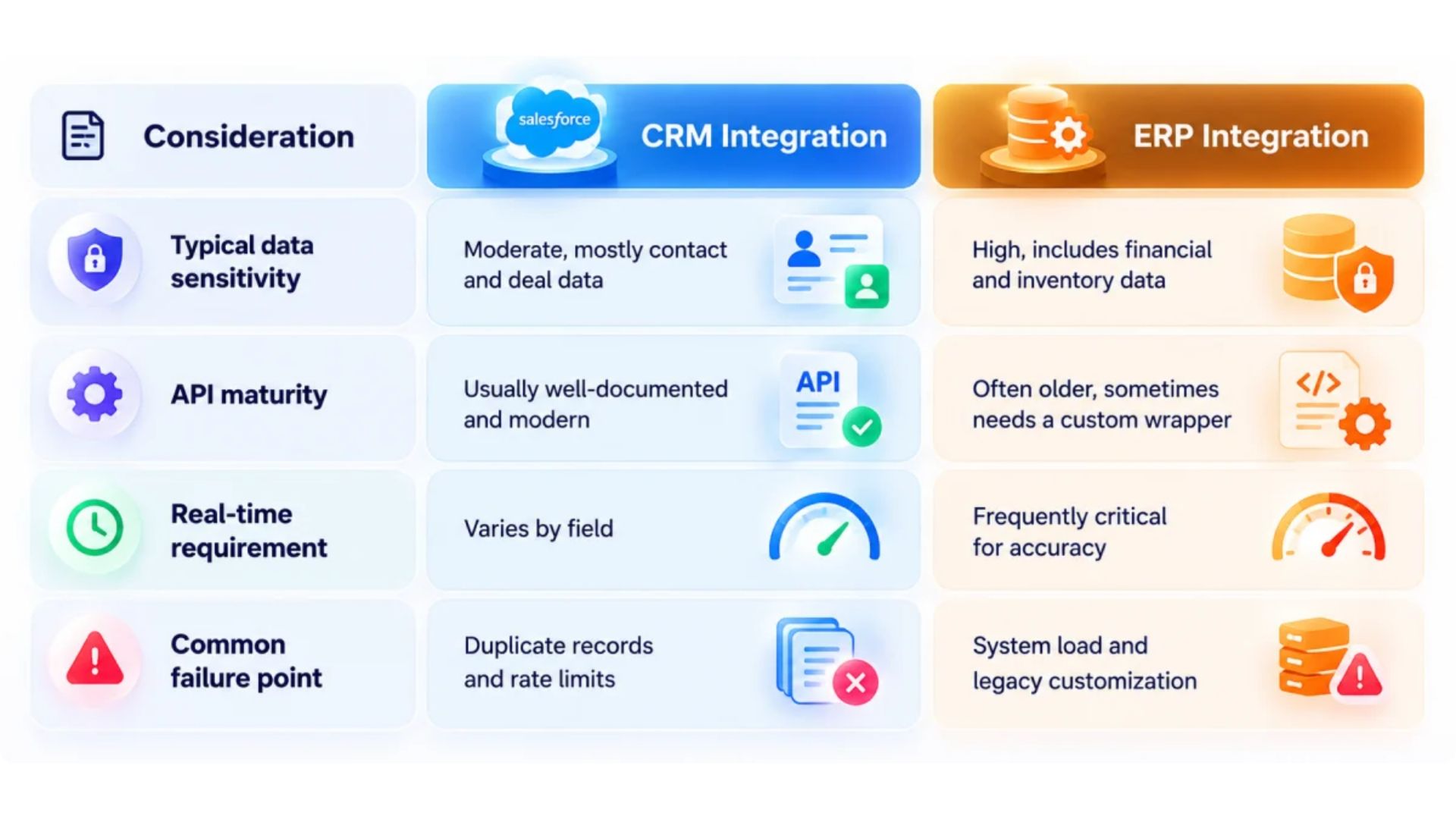
Rate limits imposed by the CRM vendor catch many teams off guard during testing, then again during a real traffic spike after launch. Build with these limits in mind from the earliest architecture conversation, not after the first throttling error appears in production.
Duplicate record creation is another frequent issue, especially when an agent creates a new contact without first checking whether one already exists. A simple lookup step before any create action prevents most of this problem entirely.
Connecting Agents to Your ERP
ERP systems hold the operational backbone of a business, from inventory counts to financial records, which raises the stakes on getting this integration right.
● Inventory, Orders, and Financial Data Access
An agent checking stock levels or order status needs accurate, current data, not a nightly batch export that already fell behind reality. Real-time or near-real-time access matters more here than in almost any other system an agent connects to.
Financial data carries its own sensitivity beyond simple accuracy. Access controls here need to be tighter than almost anywhere else in the integration, given what a mistake could actually cost.
● Why ERP Integrations Take Longer Than CRM Ones
ERP systems tend to run on older architecture, often customized heavily over years of internal use. That customization means a standard connector almost never works cleanly without meaningful adjustment first.
Budget real time for this reality rather than assuming an ERP integration matches a CRM integration in scope. A confident AI agent development company will say so directly during scoping, rather than promising a timeline it already suspects will slip.
● Balancing Real-Time Access With System Load
Older ERP systems were not built to handle frequent automated queries at agent-driven speed and volume. Hammering the system with constant requests can degrade performance for every other process relying on the same database.
Cache data that changes infrequently, and query live only for information that genuinely needs to be current. This balance protects system performance while still giving the agent what it actually needs to function well.
Integrating With Other Enterprise Systems
CRM and ERP cover the two biggest systems most agents need, but real enterprise workflows usually reach further than those two alone.
Ticketing and Support Platforms
An agent handling customer issues needs access to the ticketing system where those issues actually live. Enterprise-grade AI agent integration connects this layer early, since support workflows often provide the clearest, fastest return on an initial agent investment.
Most modern ticketing platforms expose solid APIs, which makes this integration more straightforward than either CRM or ERP work in most cases.
Working with an AI agent development company that has already connected several ticketing platforms speeds this step up considerably. Reusable patterns from prior projects often shorten what would otherwise be several weeks of exploratory integration work.
Internal APIs and Legacy Databases
Many enterprises run internal tools with APIs built for specific purposes, never designed with agent access in mind. Connecting to these systems sometimes means building a lightweight wrapper around an interface that predates agents entirely.
Document every internal system an agent might eventually need, even ones not part of the first build phase. That inventory saves real time later, once the second and third use case gets approved.
A legacy inventory system with no documented API might still expose data through an old reporting export. Building a small script to read that export regularly can bridge the gap until a proper API becomes available, or until budget allows a more permanent connector.
Document and Knowledge Repositories
Agents answering policy or process questions need access to the documents holding those actual answers. A knowledge repository integration lets an agent ground its responses in real internal documentation, rather than a general answer that sounds plausible but might not match company policy.
Keep this repository current, since an agent pulling from outdated documentation confidently repeats whatever mistake the source document already contains.
A Practical Integration Roadmap
A structured roadmap keeps integration work from expanding into an open-ended project with no clear finish line.
Phase One: Mapping Systems and Data Flows
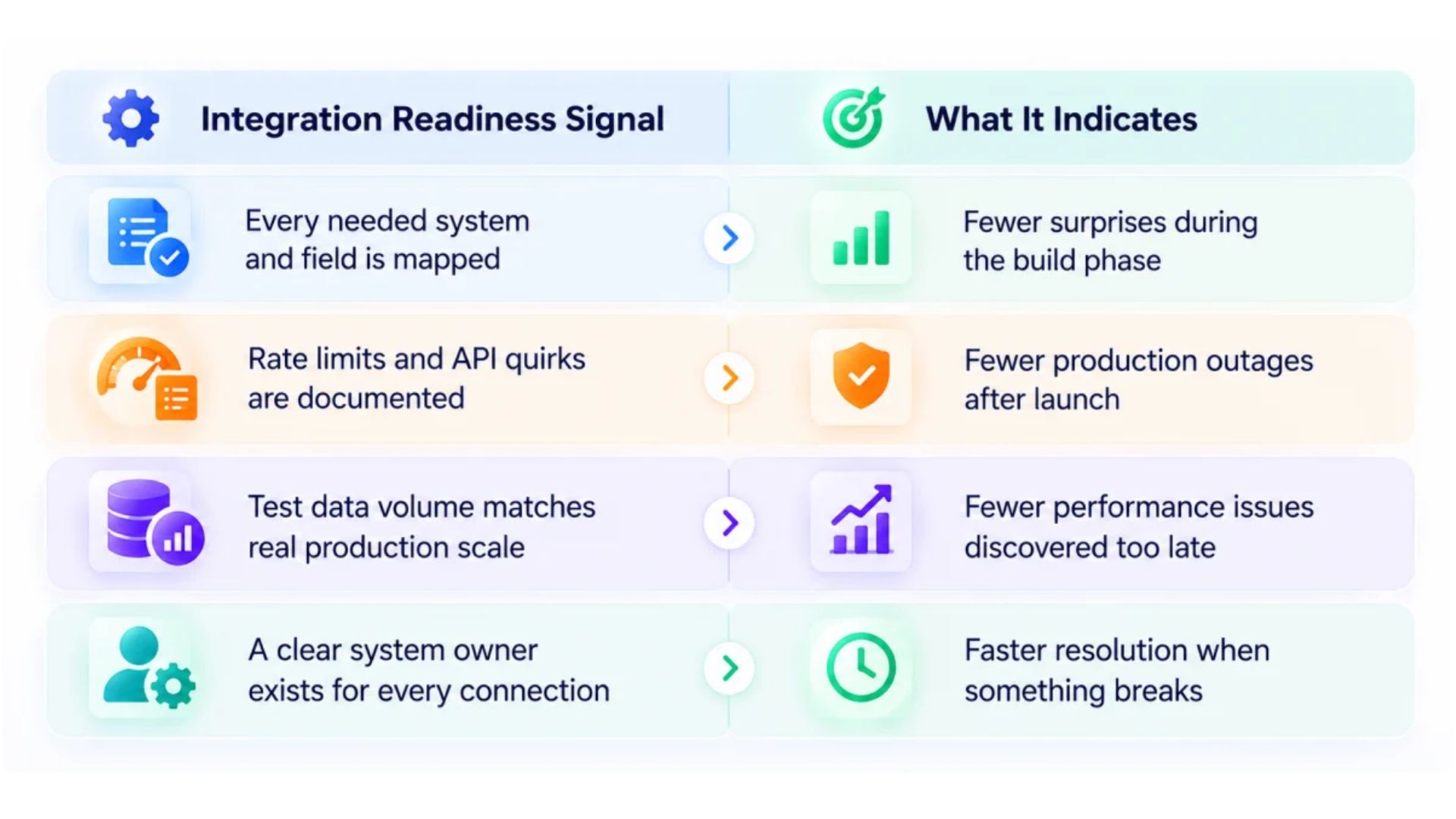
Before writing any integration code, map every system the agent needs to reach and exactly what data flows between them. This mapping exercise routinely reveals dependencies nobody had written down anywhere before.
Include every stakeholder who owns one of these systems in this mapping conversation. A system owner left out of early planning often becomes the person blocking deployment later.
Phase Two: Building and Testing Connections
Build one integration at a time, testing thoroughly before moving to the next. A pattern that works cleanly for the CRM connection often needs real adjustment before it works equally well for the ERP.
Test with realistic data volume, not just a handful of sample records. Problems that never surface with ten test records show up quickly once real production volume arrives.
Phase Three: Monitoring and Scaling
Once integrations go live, monitor them the same way any critical system deserves ongoing attention. A connection that worked perfectly at launch can degrade months later as data volume or system configuration changes.
Plan for scaling from the start, even if the first rollout only covers one department. An integration built to scale saves a costly rebuild once a second or third team wants the same capability.
Choosing the Right Integration Approach
The right technical approach depends heavily on how many systems an agent needs and how much that number is likely to grow. Real AI agent solutions built for enterprise use almost never rely on one single integration pattern across every system they connect to.
● Point-to-Point Connectors for Simple Needs
A single agent connecting to one or two systems often works fine with direct, purpose-built connectors. This approach is fast to build and easy to understand for a small, well-defined scope.
This simplicity has limits. Adding a third or fourth system to a point-to-point setup starts multiplying complexity in ways that become harder to manage cleanly over time.
● Middleware and iPaaS for Broader Scale
Integration platforms designed for connecting multiple systems can reduce duplicated work once an enterprise runs several agents across several systems. These platforms handle authentication, data mapping, and error handling in one shared layer.
The tradeoff is added platform complexity and, often, added licensing cost. This approach earns its cost mainly once the number of connections justifies a shared layer instead of several separate ones.
When a Shared Protocol Layer Makes Sense
A shared protocol standardizes how agents and tools communicate, reducing duplicated connector logic as an agent fleet grows. An AI agent development company with real multi-agent experience can help determine whether this investment makes sense for your specific scale.
Smaller deployments with one or two agents seldom need this layer yet. Growing deployments approaching five or more agents usually benefit from it considerably.
Building Integrations That Actually Hold Up
Bring in real AI agent consulting early if your team has never connected agents to CRM and ERP systems at this depth before. That guidance often prevents the exact mistakes most first integrations make.
Integration work rewards patience over speed, even though speed is usually what a project timeline pushes teams toward first. A connection rushed to meet a deadline tends to become the exact connection breaking six months later under real load.
Start with the systems delivering the clearest business value, not necessarily the easiest technical build. A CRM connection that unlocks a genuinely useful capability justifies more early effort than a simpler integration solving a smaller problem.
Document field mappings, rate limits, and authentication details as you build. That record becomes essential the moment a second team wants to extend the same integration for a different use case.
A capable AI agent development company treats every connection as production infrastructure from day one, not a detail to clean up later. Get this foundation right, and every future agent inherits systems that actually work instead of workarounds nobody trusts.