
If you’re planning a live video product, it’s easy to fixate on the player, the app design, or the content itself. The hard part often shows up earlier, inside the infrastructure choices that shape reliability, latency, and viewer trust. A live stream can look polished in demos and still fail under real traffic. Before you launch, you need a clear view of the technical checkpoints that separate a smooth rollout from a very public mess.
Start With the Network, Not the Interface:
Most teams begin with the front end because it feels visible and exciting. Live video rarely breaks there first. It usually breaks at the network layer, where unstable upload speeds, camera bottlenecks, and firewall rules quietly wreck performance.
You should test your ingest path before you debate UI details. That means checking sustained bandwidth, not just peak speed tests. A venue with “fast internet” can still produce dropped frames if upload capacity fluctuates every few minutes. Packet loss and jitter matter as much as raw throughput.
When assessing a video streaming API, consider how it fits into your capture and delivery workflow. An API is more than a developer tool in this context. It can form part of the system that manages how video is ingested, processed, secured, and distributed when network conditions are less than ideal. The important thing is to understand how the integration handles real operating conditions rather than judging it only by a successful demonstration.
Camera Inputs Create Problems Earlier Than You Expect:
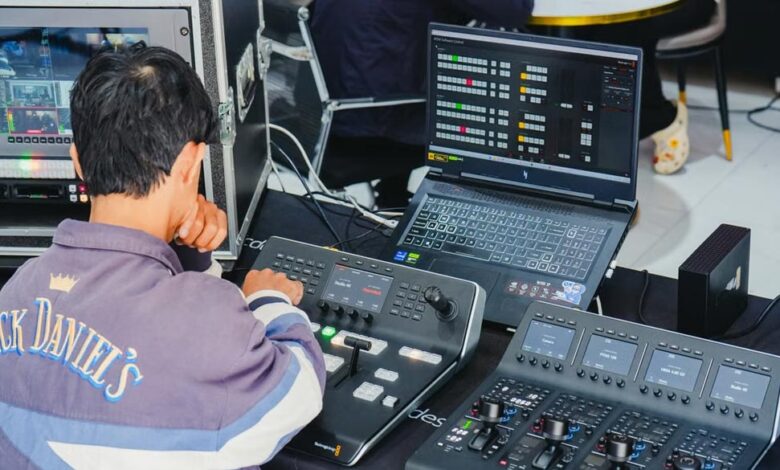
A lot of launch issues start at the camera level. Teams assume that if a camera outputs video, the rest of the stack will handle it. In practice, camera protocols, encoder settings, and output consistency can create major compatibility headaches.
You need to know your exact input setup: HDMI, SDI, RTSP, USB, or IP camera feeds. Each option affects latency, stability, and scaling. A cheap USB camera may work for a single internal stream but struggle in a multi-source production environment. IP cameras can simplify deployments, though they often introduce network dependencies that need tighter monitoring.
Codec choices matter too. H.264 remains common because it balances quality and compatibility well. Bitrate settings also need discipline. If one operator pushes a stream at a wildly higher bitrate than the network can support, the result isn’t “better quality.” It’s buffering, failed ingest, or a frozen broadcast.
Low Latency Sounds Great, but It Changes Everything:
Low-latency streaming is one of the most overused selling points in video tech. You may need it, but you should define why before committing to it. A live sports betting product, an auction platform, and a remote classroom all have different tolerance levels.
If you’re building for interaction, every extra second changes the user experience. Chat moderation, synchronized reactions, and host-audience engagement all feel off when the stream drifts too far behind real time. At the same time, reducing latency can increase complexity in playback, delivery architecture, and device support.
You should ask practical questions early. How many viewers will watch at once? Which geographies matter most? Will users join on mobile networks? A stream that performs beautifully on office Wi-Fi may collapse under mixed real-world conditions. Latency targets need to match the actual product, not a generic benchmark from a vendor pitch.
The IETF’s operational guidance for streaming media explains why latency, bandwidth, and network behavior need to be considered together. It is useful background when setting realistic performance targets for a live product.
Security and Access Control Need Real Planning:
If your stream has any value, someone will try to access it without permission, restream it, or overload it. Security can’t be bolted on once viewers already have accounts and links are circulating.
Start with authentication and authorization. You should know whether access is public, paywalled, role-based, token-protected, or geo-restricted. Those aren’t minor settings. They shape your backend logic, user management, and support burden.
Content protection matters too, especially for enterprise video, paid events, and internal communications. Signed URLs, token expiration, domain restrictions, and DRM-related planning can reduce abuse. You also need to think about operational security. Who on your team can start, stop, or reconfigure streams? A shared admin login may feel harmless during setup. It becomes a liability once multiple producers, contractors, or departments get involved.
Your Monitoring Stack Should Catch Issues Before Users Do:
One of the clearest differences between hobby streaming and professional video delivery is observability. If you only learn about a failure from angry viewers, your setup isn’t ready.
You need visibility into ingest health, stream uptime, error rates, startup time, rebuffering, and regional delivery performance. Even simple alerting can save a launch. If a primary encoder drops offline, your team should know in seconds, not ten minutes later through social posts.
This also applies to camera and network diagnostics. For example, a stream can technically stay online while quality degrades badly because of intermittent packet loss. Without proper monitoring, you may see “live” status in your dashboard while viewers see motion blur, audio drift, or repeated buffering.
Good monitoring changes decision-making. It helps you separate platform issues from on-site network failures and device-specific playback bugs. That saves time, blame, and budget.
The AWS Well-Architected Streaming Media Lens offers further guidance on monitoring transport performance, building redundancy into contribution paths, and planning for network failures. These considerations can help teams assess whether their monitoring and recovery plans are strong enough for production.
Scaling Live Video Is More Than Handling More Viewers:
When people talk about scaling, they usually mean traffic spikes. That’s only one part of it. Real scaling also covers operations, content workflows, support requests, and failure recovery.
You should map what happens if your audience doubles unexpectedly. Can your delivery layer absorb it? Can your support team handle login issues, playback complaints, and access problems at the same time? Can your production team switch to a backup feed without improvising under pressure?
Live video products often fail at the edges. Captioning gets delayed, backup encoders aren’t configured, archived playback doesn’t process correctly, or one region sees degraded performance because testing focused only on domestic users. These details feel secondary until launch day.
A stronger approach is to run scenario drills. Simulate high concurrency, encoder failure, bad venue internet, and last-minute source changes. Teams that rehearse operational stress usually ship with fewer surprises.
Build the Checklist Before You Build the Hype:
The most expensive mistake in live video is assuming that polished branding can cover weak infrastructure. It can’t. Viewers are surprisingly forgiving about visual simplicity. They’re much less forgiving about lag, outages, or access failures.
You should create a pre-launch checklist that includes network readiness, camera compatibility, bitrate policy, latency targets, security controls, monitoring, failover, and support ownership. Keep it specific. “Test stream quality” is vague. “Run a two-hour sustained uplink test on the actual venue connection” is useful.
The teams that launch well usually seem boring in the best possible way. They document assumptions, verify inputs, and stress-test the system before the audience arrives. If you want a live video product that feels effortless to users, the behind-the-scenes process has to be exacting. That discipline is what turns streaming from a risky feature into a dependable product.