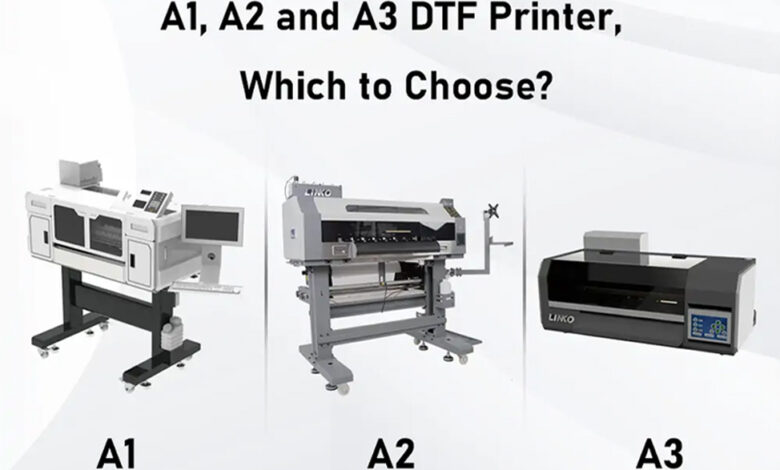

Direct-to-film (DTF) printing has become a popular method for producing custom apparel. It allows businesses to print colorful designs onto transfer film and apply them to fabrics using heat and pressure. From small custom T-shirt shops to larger garment manufacturers, DTF printing supports a wide range of production needs.
One important decision when choosing a DTF printer is the print size. A1, A2, and A3 refer to different paper and print format dimensions. Each size offers different advantages in terms of workspace, production capacity, and application. Understanding these differences can help businesses select equipment that fits their daily workload.
Understanding A1, A2, and A3 Print Sizes
The A-series paper format follows an international standard. Each size is approximately half the area of the next larger size.
- A1: 594 × 841 mm
- A2: 420 × 594 mm
- A3: 297 × 420 mm
These measurements describe standard sheet formats, not necessarily the exact printable area of a DTF printer. The actual print width depends on the machine’s design, film feeding system, and technical specifications.
A1 provides the largest format among the three, while A3 is more compact. A2 sits between them and may offer a practical balance for businesses with moderate production requirements.
It is also important to distinguish film width from finished design size. A printer may support a particular film format, but individual designs can be smaller and arranged together to use the available space efficiently.
A1 DTF Printers: For Larger Production Needs
A1 DTF printers are designed for wider printing formats. They can be useful for businesses that regularly produce large graphics, multiple garment designs, or high volumes of transfers.
The larger print area allows operators to arrange several designs across the film, depending on their dimensions and spacing requirements. This can reduce the number of separate print runs needed for certain orders.
A1 equipment may suit established apparel businesses, commercial print shops, and manufacturers serving wholesale customers. However, a larger format also requires more workspace and careful planning for film handling, powder application, curing, and maintenance.
Businesses should not assume that a wider printer automatically delivers higher output. Printhead configuration, printing speed, resolution, workflow organization, and curing capacity all affect actual production.
A2 DTF Printers: A Balance Between Size and Capacity
A2 DTF printers offer a middle ground between larger production equipment and compact desktop models. They may be suitable for businesses that receive regular orders but do not need the full width of an A1 system.
The available print area can accommodate multiple smaller designs or larger individual graphics, depending on the machine’s specifications. This flexibility can help shops manage different order types without investing in the largest equipment format.
A2 equipment may appeal to growing custom apparel businesses that need more room for design layouts but have limited floor space. Before purchasing, operators should compare the machine’s actual printable width, supported film size, and expected daily output.
The total workflow also matters. A printer that meets production needs may still create a bottleneck if the curing unit or heat press cannot keep pace with the printed transfers.
A3 DTF Printers: A Practical Choice for Small Businesses
A3 DTF printers are often considered by startups, small print shops, and businesses producing customized garments in smaller batches. Their compact format can make them easier to accommodate in limited workspaces.
For businesses testing demand or expanding from manual transfer methods, an A3 system may offer a manageable way to introduce DTF printing. It can support custom T-shirts, logos, small graphics, and other apparel designs within its printable area.
An A3 printer can also be useful for sample production and short-run orders. However, its smaller format may require more print runs when handling large orders or several wide designs.
When comparing equipment, businesses should review the specifications of each model rather than relying on the A3 label alone. For example, the A3 DTF printer from LINKO is one option to evaluate when looking for a desktop printing solution. Buyers should check its printable area, compatible film, printing speed, and workflow requirements against their intended applications.
How to Choose the Right DTF Printer Size
Choosing between A1, A2, and A3 starts with understanding the type and volume of work a business handles.
- Assess daily order volume
Estimate how many transfers you need to produce on a typical day. A small shop handling occasional personalized orders may not need a large-format system. A business serving wholesale customers may benefit from a wider print area and a workflow designed for continuous production.
- Consider the size of your designs
Small logos and chest prints require less space than large back graphics or multiple designs arranged on one film sheet. Review your most common designs and determine how efficiently they fit within each format.
- Measure your workspace
A larger printer needs more than space for the machine itself. Consider access for loading film, operating the curing equipment, maintaining the printer, and handling finished transfers.
- Compare the complete workflow
DTF printing involves more than printing. Film feeding, adhesive powder application, curing, and heat pressing all influence the final production rate. The printer size should match the capacity of the other equipment in the workflow.
- Review long-term costs
Compare equipment prices, consumables, maintenance requirements, labor, and expected order volume. A larger machine may be worthwhile for a busy shop, while a compact system may make more sense for a business with lower demand.
Final Thoughts
A1, A2, and A3 DTF printers serve different production needs. A1 offers a wider format for businesses handling larger layouts and higher workloads. A2 provides a middle option for growing operations, while A3 can suit small businesses, sample production, and compact workspaces.
There is no single best size for every printing business. The right choice depends on design dimensions, order volume, available space, and the capacity of the complete production workflow.
Businesses comparing equipment can explore different printing solutions from DTF LINKO and evaluate the specifications that best match their applications. By balancing print format with real production requirements, buyers can make a more informed equipment decision.