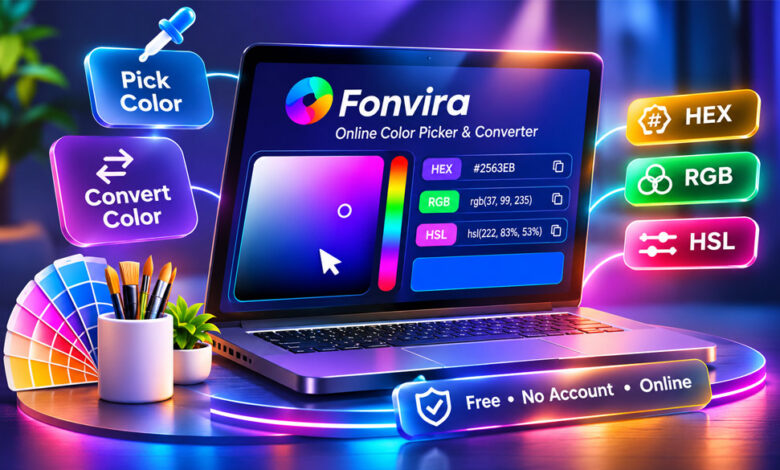

Fonvira is a free online color picker and converter. It helps users choose colors and find their HEX, RGB, and HSL values. It works directly in a web browser, so there is no need to install software or create an account.
Fonvira can be useful for web design, CSS, graphics, and branding. In this review, we explain how Fonvira works, its main features, safety, privacy, benefits, and limitations.
What Is Fonvira?
Fonvira is an online tool for choosing and converting digital colors. It lets users select a color and see its HEX, RGB, and HSL values.
For example, you may have a HEX color but need the same color in RGB. Fonvira can show you the matching RGB value without requiring you to calculate it yourself.
You can also choose a color visually and then copy its code for your website, CSS file, graphic, or another project.
Fonvira is mainly a color tool. It is not a full graphic design program, image editor, or website builder.
How Does Fonvira Work?
Fonvira works directly in a web browser.
First, open the Fonvira website. You can then choose a color with the color picker or enter a HEX code you already have.
The tool shows the matching HEX, RGB, and HSL values. You can also see a live preview of the selected color.
Using Fonvira is simple:
- Open Fonvira in your browser.
- Choose a color or enter a HEX code.
- Check its HEX, RGB, and HSL values.
- Look at the live color preview.
- Copy the color code you need.
- Paste it into your website, CSS, design, or other project.
It is still a good idea to check the color in your final design. Colors can look slightly different on different screens.
Main Features of Fonvira
Fonvira has a small set of tools for working with digital colors.
Online Color Picker
The color picker lets you choose a shade visually.
This is useful when you know what type of color you want but do not know its exact code. You can try different shades and see the result right away.
If you already have a HEX code, you can enter it instead.
HEX Color Codes
HEX is a common color format used on websites.
A standard HEX code starts with a # and normally contains six characters. For example:
#2563EB
HEX codes are commonly used in CSS, website themes, website builders, and brand guides.
Fonvira lets you find and copy the HEX value of a selected color.
RGB Color Conversion
RGB stands for red, green, and blue.
These three colors are mixed at different levels to create colors on digital screens. A common RGB value looks like this:
rgb(37, 99, 235)
Fonvira can show the RGB value that matches your selected color. You do not need to convert it manually.
RGB is commonly used in websites, programming, and digital graphics.
HSL Color Values
HSL stands for hue, saturation, and lightness.
Hue describes the main color. Saturation controls how strong or soft the color looks. Lightness controls how light or dark it is within the HSL system.
For example, #2563EB can be shown approximately as:
hsl(222, 83%, 53%)
HSL can be useful when you want to adjust a color. You can change its saturation or lightness while keeping a similar hue.
Live Color Preview
Fonvira shows a live preview of your selected color.
This helps you see the shade instead of looking only at its code.
However, the preview cannot show exactly how the color will look on every screen. Screen settings and other colors around it can affect its appearance.
The preview also does not tell you if a color combination meets accessibility rules.
One-Click Copy
Fonvira provides a simple copy function.
You can copy a HEX, RGB, or HSL value and paste it into another program or website.
This saves time and can also help avoid typing mistakes.
Understanding HEX, RGB, and HSL
HEX, RGB, and HSL are different ways of describing digital colors.
They can represent the same color.
| Format | Meaning | Example | Common Use |
|---|---|---|---|
| HEX | Color written using hexadecimal values | #2563EB |
CSS and websites |
| RGB | Red, green, and blue | rgb(37, 99, 235) |
Websites and graphics |
| HSL | Hue, saturation, and lightness | hsl(222, 83%, 53%) |
Adjusting colors |
Changing a color from HEX to RGB does not automatically change how the color looks. You are mainly changing the way its value is written.
HSL values can sometimes be rounded. Because of this, converting a rounded HSL value back to RGB may produce a very small difference in the numbers.
Who Can Use Fonvira?
Fonvira can be useful for many people who work with digital colors.
Web designers and developers can use it to find colors for buttons, backgrounds, links, menus, and other website elements.
Graphic designers and branding teams can use exact color codes when sharing brand colors with other people.
Bloggers and content creators can use it when choosing colors for websites, thumbnails, graphics, and headings.
Digital marketers can use exact color codes to keep advertisements and other marketing materials consistent.
Small-business owners can use it to reuse the same brand colors across their websites, social media graphics, and presentations.
Students and beginners can use Fonvira to learn how HEX, RGB, and HSL work.
Fonvira for Website Design and Branding
Using the same colors across a website can make the design look more consistent.
For example, a business may have one main color for buttons and links, another color for smaller design elements, and simple colors for text and backgrounds.
Using exact color codes helps make sure the same shade appears across different pages.
Fonvira can help users find these codes and share them with designers, developers, and other team members.
Developers can also save important colors as CSS variables. For example:
--brand-primary: #2563EB;
The same color can then be used in different parts of the website.
Fonvira can help find and convert a color, but it does not create a complete brand design. Users still need to think about readability, accessibility, and how different colors work together.
Color Accessibility and Readability
A color can look good by itself but become difficult to read when used with another color.
Text and background colors need enough contrast.
Under WCAG 2.2 Level AA guidance, normal text generally needs a contrast ratio of at least 4.5:1. Large text generally needs at least 3:1, although some exceptions apply.
For example, very light gray text on a white background can be difficult to read.
Fonvira can give you the color values, but it should not be treated as a complete accessibility checker.
For important website colors, use a separate contrast checker to test the text and background together.
Websites should also avoid using color as the only way to show important information. Warnings, errors, links, and other important elements may need another visual sign.
Is Fonvira Free?
Fonvira is presented as a free online tool.
According to the available information, users do not need a paid subscription to use its basic color tools.
An account is also not required. You can visit the website and start using the tool without signing up.
No paid plans or premium versions are described in the information we reviewed.
Fonvira’s terms also reportedly allow its tool and output to be used for personal and commercial purposes, subject to its terms.
Supported Devices and System Requirements
Fonvira works through a web browser.
The available information says it works on both desktop and mobile browsers. There is no need to install separate software.
No detailed system requirements are provided. There is no confirmed minimum RAM, storage, processor, or operating system requirement.
The available information also does not identify separate Fonvira apps for Windows, macOS, Android, or iOS.
Is Fonvira Safe and Private to Use?
Fonvira does not require an account for its normal color tools. This means you do not need to provide registration details just to convert a color.
According to Fonvira’s published privacy information, color values are processed inside the user’s browser. Fonvira also states that selected color values are not stored on its servers.
Its privacy information says the website does not use advertising or tracking cookies.
However, this does not mean the website makes no internet connections.
Third-Party Services and Network Activity
According to the available privacy information, Fonvira uses Google Fonts and a content delivery network.
These services may connect to other servers when the website loads. Normal hosting and security services may also create technical logs.
The website’s contact form reportedly uses an outside service to send messages.
This is different from the color conversion itself. Fonvira states that its color processing happens locally in the browser.
People with strict privacy needs should read the latest privacy policy before using the website.
Benefits of Using Fonvira
Fonvira is simple and focuses on basic color tasks.
Its main benefits include:
- Free access
- No account required
- No software installation
- HEX, RGB, and HSL support
- Live color preview
- Quick copy function
- Desktop and mobile browser access
- Easy color conversion
- Simple enough for beginners
- Can reduce mistakes when copying color codes
It can be useful when you only need to check or convert a color and do not want to open a large design program.
Limitations of Fonvira
Fonvira is mainly a color picker and converter. This means it has some clear limits.
It is not a full graphic design program. It does not replace software made for image editing, layouts, illustrations, typography, or complete design projects.
It is also not a website builder or full branding platform.
The available information does not confirm a complete built-in accessibility checker. Users should test color contrast separately.
There is also no confirmed Fonvira API or direct integration with tools such as Figma, Canva, Photoshop, WordPress, or Visual Studio Code in the information we reviewed.
Support for newer color formats such as OKLCH and Display P3 is also not clearly confirmed.
Some information about Fonvira itself is limited. Its founder, owner, development team, headquarters, and exact launch date are not clearly confirmed in the available sources.
Common Color Mistakes to Avoid
Treating HEX and RGB as Different Colors
HEX and RGB can describe the same color.
For example:
#2563EB
and
rgb(37, 99, 235)
can represent the same sRGB color.
Changing the format does not automatically make the color lighter, darker, or stronger.
Forgetting About Transparency
A normal six-digit HEX code does not include transparency.
Modern CSS can use other formats, including eight-digit HEX and color functions with an alpha value, when transparency is needed.
The available information does not clearly confirm advanced transparency conversion as a Fonvira feature.
Relying Only on the Preview
A live preview is useful, but colors may look different on different screens.
Display settings, screen quality, lighting, and surrounding colors can all affect how a color looks.
Always check important colors in the final website, app, or graphic.
Ignoring Accessibility
A good-looking color combination may still be difficult to read.
Check important text and background colors with a proper contrast checker before publishing your website or design.
Ignoring Wider Color Spaces
HEX, RGB, and HSL are commonly used with sRGB colors.
Modern web technology can also support wider color spaces and newer formats, including Display P3 and OKLCH.
Advanced design work may need a more complete color-management tool.
Tips for Using Fonvira
You can make color work easier by following a few simple steps:
- Save the exact HEX codes of important brand colors.
- Write down where each color should be used.
- Give designers and developers the same approved color values.
- Check colors in the final website or design.
- Test text and background contrast separately.
- Do not choose brand colors only by eye.
- Use CSS variables when the same colors appear across a website.
For example, a business can save its main blue as #2563EB and use that exact code every time the main brand color is needed.
Fonvira can help find and convert the color. Your website or design system can then control where that color is used.
Fonvira vs Advanced Design Tools
Fonvira and full design tools have different purposes.
Fonvira focuses on simple color tasks. It lets users choose a color, view its HEX, RGB, and HSL values, preview it, and copy its code.
Advanced design software can offer much more. It may include image editing, layouts, typography, illustrations, team collaboration, design libraries, and reusable elements.
You do not always need a large design program. If you only want to convert a HEX code to RGB, a simple online tool can be easier.
For complete designs, advanced color work, accessibility testing, or team projects, other tools may be needed.
Fonvira Alternatives
The best Fonvira alternative depends on what you need to do.
Other Online Color Converters
Other online color converters can perform similar basic tasks.
They may convert colors between HEX, RGB, HSL, and other formats. These tools are useful when you only need quick color conversion.
Color Palette Generators
Color palette generators help users find groups of colors that work well together.
They can be more useful when creating a website theme, brand identity, illustration, or other project that needs several matching colors.
Accessibility Contrast Checkers
Contrast checkers compare text and background colors.
They calculate the contrast ratio and help users check whether a color combination meets accessibility guidelines.
Fonvira can provide the color values, while a contrast checker can test how well those colors work together.
Browser Developer Tools
Modern browsers include developer tools for inspecting websites.
Developers can use them to check CSS and see colors already being used on a webpage. Some browsers also provide built-in color controls.
These tools are useful when you want to inspect or change a color that is already on a website.
Full Design Platforms
Full design platforms are better for creating complete graphics, website interfaces, layouts, and other visual projects.
They provide many more features than a basic color converter.
However, a large design program may be unnecessary when you only need to find or convert a color code.
Is Fonvira Worth Using?
Fonvira may be useful if you need a simple way to choose and convert digital colors.
Its main strength is its simple purpose. Users can work with HEX, RGB, and HSL without installing a large program or creating an account, according to the available information.
It can also help beginners understand how different color formats work.
However, Fonvira has a limited set of tools. It does not replace professional design software, accessibility checkers, or advanced color-management tools.
For simple color selection and conversion, its basic tools cover the main needs.
Bottom Line
Fonvira is a simple online color picker and converter. It helps users work with HEX, RGB, and HSL values and includes a live preview and copy function.
The available information describes Fonvira as free and says no account or software installation is required.
It can be useful for web developers, designers, students, marketers, bloggers, and other people who work with digital colors.
Its main limitation is its simple feature set. For accessibility testing, advanced color formats, full design work, or complete color palettes, users may need other tools.
Frequently Asked Questions
What is Fonvira?
Fonvira is an online color picker and converter that helps users find HEX, RGB, and HSL color values.
What is Fonvira used for?
It is used to select, preview, and convert digital colors for websites, CSS, graphics, branding, and other digital projects.
Is Fonvira free to use?
Yes. The available information describes Fonvira as a free online tool.
Do I need an account to use Fonvira?
No. According to the available information, you can use its basic color tools without creating an account.
Does Fonvira support HEX, RGB, and HSL?
Yes. These are the three main color formats supported by the tool according to the available information.
Can I use Fonvira on my phone?
Yes. Fonvira is described as working through both desktop and mobile web browsers.
Does Fonvira store my selected colors?
According to Fonvira’s published privacy information, color processing happens inside the browser, and selected color values are not stored on its servers.
Is Fonvira an accessibility checker?
No. Fonvira should not be used as a complete accessibility checker. Use a separate contrast checker to test text and background colors.