Hi3D V3.0: Helping Designers Move Faster from Creative Concepts to Finished 3D Models

AI 3D Creation Is Changing the Way Designers Develop New Ideas
Design has always started with ideas. A rough sketch, a reference image, or a simple concept can become the foundation of a product, character, or creative project. However, turning these early ideas into complete 3D models has traditionally required a long process involving modeling, editing, texturing, and optimization.
For professional designers, the challenge is often not a lack of creativity, but the time required to transform creativity into something visible and usable. Rebuilding every detail manually can slow down the design process and limit the number of ideas that can be tested.
The development of AI 3D tools is changing this workflow. Instead of replacing designers, AI can assist with repetitive and time-consuming tasks, allowing creators to focus more on design decisions and creative direction.
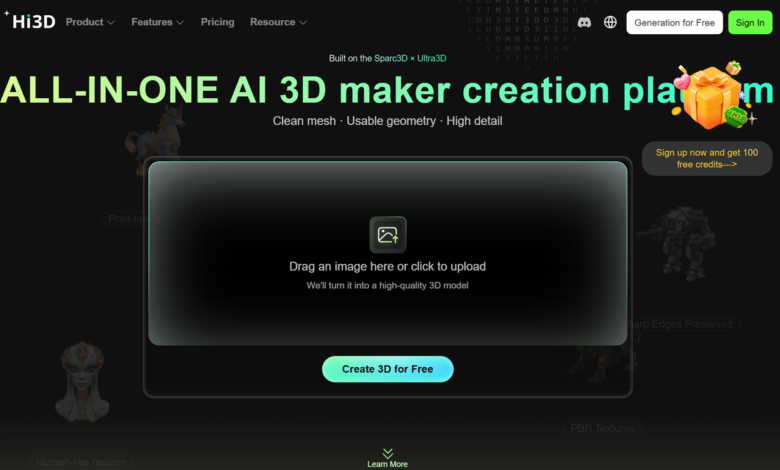
Hi3D is built around this idea. It provides AI-powered tools that help users generate 3D models from images and text, improve model appearance through AI texture generation, and prepare designs for 3D printing.
With the release of Hi3D V3.0, the platform introduces major improvements in model reconstruction, structure understanding, and texture quality. These upgrades make AI-generated models more suitable for designers who need both creative flexibility and practical results.
- Turning Design References into 3D Models for Faster Concept Exploration
The early stage of design often involves exploring many different possibilities. Designers may create multiple sketches, collect references, or experiment with different styles before choosing a final direction.
Creating a 3D version of every concept through traditional modeling can take significant time. This makes rapid experimentation difficult, especially when working on projects that require multiple design options.
Hi3D provides a faster approach by allowing designers to start from existing visual ideas.
1.1 Transforming 2D concepts into editable 3D possibilities
Images are often the starting point of creative projects. A product sketch, character illustration, or visual reference can communicate important design information.
However, a 2D image only shows one perspective. Turning it into a complete 3D object usually requires designers to manually build the structure and estimate unseen details.
Hi3D simplifies this process through AI generation. The 2D to 3D image converter capability helps transform two-dimensional references into three-dimensional models, giving designers a faster way to visualize their ideas.
This does not replace the creative role of designers. Instead, it provides a starting point that can be reviewed, adjusted, and developed further.
For product designers, this means more concepts can be tested during the early stage. For artists, it provides a quicker way to explore different forms and styles.
1.2 Supporting creative experiments through text-based generation
Some ideas exist before a visual reference is created. Designers may imagine a unique object, character, or product concept but need a way to quickly visualize it.
Hi3D also supports text-based 3D generation, allowing users to describe their ideas and create initial models.
This approach is especially useful during brainstorming. Designers can quickly test different creative directions before investing more time into detailed modeling.
As a 3D model maker, Hi3D provides a flexible starting point for both professional creators and independent designers.
- AI Texture Generation Helps Designers Focus More on Visual Creativity
A strong design is not only about shape. Materials, colors, and surface details influence how people understand and experience an object.
In traditional workflows, texture creation can become a separate stage that requires additional skills and time. Designers may spend many hours adjusting materials and surface details before achieving the desired appearance.
Hi3D helps simplify this process through AI-assisted texture generation.
2.1 Improving visual quality without complicated manual work
For many creators, texturing is one of the more technical parts of 3D production.
A model may have the correct structure, but without suitable textures it may not fully express the original design idea.
Hi3D helps reduce this difficulty by allowing AI to assist with surface details. The AI 3D model texturing function helps users create richer appearances and improve the visual quality of generated models.
This is useful for projects that depend heavily on appearance, including collectible designs, character models, product prototypes, and creative objects.
2.2 Better texture results with Hi3D V3.0
Hi3D V3.0 further improves the texture generation experience. The new version increases texture output capability up to 8K and upgrades the self-developed UV completion algorithm.
These improvements enhance texture clarity, color transitions, and surface detail recognition, allowing models to maintain better visual consistency.
For designers, better texture quality means AI-generated models can become closer to presentation-ready assets.
- From Digital Design to Physical Production with Practical Printing Features
For many designers, the final goal is not only creating a digital model but seeing the design become a physical object.
However, moving from a completed model to a successful print still requires preparation. Large models may need to be separated, colors need to be organized, and printing layouts need to be adjusted.
Hi3D includes several functions that help designers complete this final stage.
3.1 Creating colorful printed models
Many creative projects rely on multiple colors to communicate design details.
Hi3D’s multi-color printing function helps convert textured models into printable multi-color objects by generating color regions, matching filament colors, and reducing manual adjustments.
This allows designers to better reproduce the appearance of their digital creations.
3.2 Making complex models easier to print
Some designs are too large or structurally complex to print as one piece.
Hi3D provides split-for-printing functions that divide models into printable sections and generate connectors for assembly.
The smart arrangement feature also helps organize models on the build plate, recommend suitable orientations, and export 3MF files with recommended slicer settings.
These tools help reduce preparation work before printing.
- Hi3D V3.0 Official Release: A New Stage for AI-Assisted Design Creation
The release of Hi3D V3.0 reflects a broader change in AI 3D development.
Early AI creation tools mainly focused on generating models quickly. However, designers need more than speed. They need accuracy, consistency, and models that can continue through the next stages of the workflow.
Hi3D V3.0 focuses on improving these practical aspects.
The purpose of the update is not simply to create more models, but to create better models that designers can actually use.
4.1 Moving beyond simple AI generation
In professional design work, a generated model is only valuable when it can support further development.
A designer may need to adjust details, prepare the model for printing, or use it as a foundation for another project.
Hi3D V3.0 improves this experience by increasing reconstruction quality and strengthening the connection between AI generation and practical design needs.
This allows designers to spend less time fixing basic problems and more time refining creative decisions.
- Hi3D V3.0 Core Technology Upgrade: More Accurate Reconstruction and Better Model Understanding
The quality of AI-generated models depends on how well AI can understand the original design.
Complex objects contain many structural details, and preserving these details is essential for professional use.
Hi3D V3.0 introduces important improvements in this area.
5.1 Higher reconstruction resolution for detailed models
Hi3D V3.0 increases geometric reconstruction resolution to 2048³ voxel-level and becomes the first commercially available AI 3D model with this level of resolution.
Higher reconstruction capability allows the system to capture more information from input images and create models with improved structural accuracy.
This helps preserve complex shapes, small components, and important design details that are valuable during the development process.
For designers, improved reconstruction means AI-generated models can better reflect the original concept.
5.2 Stronger understanding of complex structures
A single image does not provide complete information about an object. AI needs to understand hidden surfaces and relationships between different parts.
Hi3D V3.0 improves cross-view structure reasoning, helping generated models maintain stronger consistency from different perspectives.
This improvement is important for creators who need models that are not only visually appealing but also structurally reliable.
- Hi3D V3.0 Development Journey: Building Better Tools for Creative Workflows
Hi3D V3.0 is based on continuous improvements across previous versions.
Each generation has focused on addressing different challenges in AI 3D creation.
6.1 The evolution from V1.0 to V3.0
Hi3D V1.0 introduced a commercially available 1536³ voxel-resolution image-to-3D model, improving detailed structure reconstruction.
Hi3D V2.0 focused on integrated geometry and texture generation, improving structural completion and creating a more complete generation experience.
Hi3D V3.0 continues this development by improving geometric precision, complex structure reasoning, texture quality, and practical functions such as smart splitting, multi-color printing, and arrangement tools.
This progression shows how AI 3D technology is developing from a simple generation tool into a more useful part of the creative process.
6.2 Supporting modern design workflows
Today’s designers often need to move quickly between inspiration, testing, modification, and production.
Hi3D V3.0 supports this faster creative cycle by helping users develop ideas more efficiently.
- Hi3D V3.0 Industry Applications and 48-Hour Free Experience
AI 3D creation is becoming useful across many different fields.
Designers, businesses, educators, and creators are exploring how faster model generation can support their projects.
7.1 Expanding possibilities across creative industries
High-quality 3D models are increasingly used in areas such as 3D printing, digital art, game and film production, jewelry design, collectibles, education, e-commerce content, and industrial design.
These applications all require models with accurate structures, detailed textures, and practical usability.
Hi3D V3.0 helps creators reduce technical limitations and explore more possibilities with AI-assisted 3D workflows.
7.2 Try Hi3D V3.0 with unlimited access for 48 hours
With improvements in reconstruction accuracy, texture generation, and printing preparation, Hi3D V3.0 provides designers with a more efficient way to create and develop 3D assets.
Hi3D V3.0 is officially released, and users can experience the upgraded platform through a 48-hour free trial. During the trial period, there is no limit on usage frequency, allowing creators to explore the new features and test different ideas freely.
Start exploring Hi3D V3.0 today and discover a more efficient way to transform design concepts into detailed, practical 3D models.