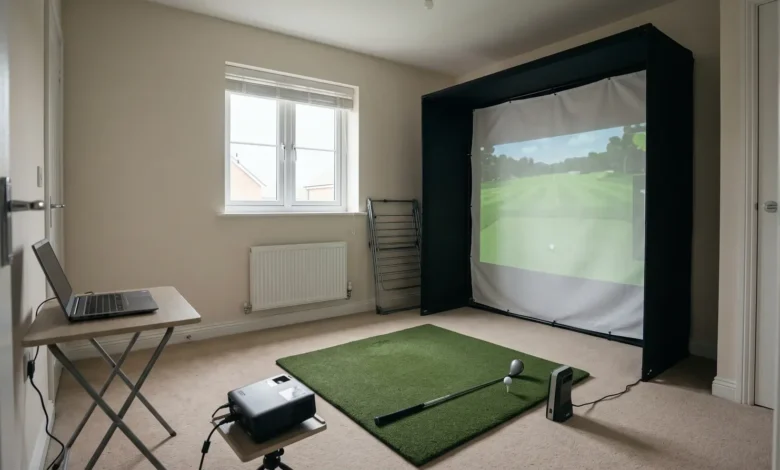

Building a home golf simulator is an exciting way to enjoy golf throughout the year, improve your swing, and practice without travelling to a golf course. With the right equipment, you can create an indoor golf environment that delivers realistic gameplay, accurate shot feedback, and an enjoyable experience for golfers of different skill levels.
A SkyTrak Launch Monitor is a popular option for golfers who want to build a home simulator with detailed performance data and virtual golf capabilities. By combining the right launch monitor, simulator software, impact screen, projector, and hitting area, you can transform a spare room, garage, or basement into a personal golf practice space.
Simply Golf Simulators helps golfers explore simulator equipment and solutions that suit their available space, playing preferences, and performance goals. Here is how to approach building a realistic home golf simulator.
- Choose the Right Launch Monitor
The launch monitor is the foundation of any golf simulator setup. It captures important information about your shots and provides feedback that helps you understand your performance.
The SkyTrak Launch Monitor uses camera-based technology to measure ball flight and provide useful shot data. Golfers can review information such as ball speed, launch angle, carry distance, and other performance metrics, depending on the model and software configuration.
This information can help players identify inconsistencies, monitor improvement, and make more informed adjustments during practice.
Before choosing a launch monitor, consider:
- Your available installation space.
- Whether you prefer a portable or permanently installed system.
- The type of shot data you want to review.
- Compatibility with your preferred simulator software.
- Your overall equipment budget.
Choosing equipment that matches your needs will make the entire simulator experience more enjoyable.
- Consider a ProTee VX Overhead Launch Monitor
Another option worth exploring is the ProTee VX Overhead Launch Monitor. Unlike traditional floor-positioned launch monitors, this system is mounted overhead, making it an interesting solution for golfers who want a clean and organized hitting area.
Its overhead design can reduce the need to reposition equipment between shots and helps keep the floor around the hitting mat clear.
The ProTee VX is designed to capture club and ball data, providing detailed feedback for practice and simulator gameplay. Its installation requirements and compatibility should be reviewed before purchasing.
Although the SkyTrak and ProTee VX offer different approaches to launch monitoring, both can serve golfers looking to create an engaging indoor golf environment. The best choice depends on your room layout, preferred technology, and simulator requirements.
- Measure Your Available Space
Before purchasing additional equipment, measure the room where you plan to install your simulator.
A comfortable setup requires enough room to swing your driver without hitting walls, ceilings, or nearby objects.
Consider three important measurements:
- Ceiling height: Ensure there is enough clearance for your full swing.
- Room width: Allow sufficient space for right-handed and left-handed golfers if needed.
- Room depth: Account for the hitting position, launch monitor placement, impact screen, and projector.
A garage, basement, or dedicated recreation room can work well when the dimensions are suitable.
- Install a Quality Hitting Mat and Impact Screen
Your hitting surface and impact screen play an important role in creating a realistic golf experience.
A quality golf hitting mat provides a stable surface for practicing different shots. Look for a mat that offers realistic turf interaction, adequate cushioning, and enough space for your stance.
An impact screen allows you to project virtual golf courses directly in front of your hitting area. It should be durable enough to withstand repeated golf ball impacts while providing a clear viewing surface.
For additional safety and a professional appearance, consider installing an enclosure with protective side netting.
- Add a Projector and Golf Simulator Software
A projector brings your home golf simulator to life. It displays virtual courses, driving ranges, and shot information on the impact screen.
When selecting a projector, consider:
- Resolution: Full HD or 4K can provide clearer course visuals.
- Brightness: Choose sufficient brightness for your room’s lighting conditions.
- Throw distance: Make sure the projector fits your room dimensions.
- Mounting position: Avoid placing it where golf clubs or balls could damage it.
You will also need compatible golf simulator software. Depending on your launch monitor, available software can provide virtual courses, practice ranges, multiplayer games, and performance tracking.
Always verify software compatibility before purchasing your equipment.
- Configure and Test Your Simulator
Once all components are installed, follow the manufacturer’s setup instructions to connect your launch monitor, computer, and simulator software.
Position your hitting mat correctly, check the launch monitor alignment, and ensure the projector displays the course properly.
Start by hitting several practice shots with different clubs. Review the available shot data and check whether the readings are consistent.
Make any necessary adjustments to lighting, equipment positioning, and software settings before inviting friends or family to play.
Build Your Home Golf Simulator With Simply Golf Simulators
Creating a realistic home golf simulator involves more than purchasing a launch monitor. You need compatible equipment, appropriate room dimensions, quality installation components, and software that brings everything together.
Whether you are considering a SkyTrak Launch Monitor for a flexible indoor setup or a ProTee VX Overhead Launch Monitor for a permanently installed simulator, choosing the right configuration can make a significant difference in your experience.
Simply Golf Simulators helps golfers explore launch monitors, simulator accessories, and complete golf simulation solutions. With the right setup, you can enjoy virtual golf, practice your swing, and work toward improving your performance from the comfort of home.
Ready to build your home golf simulator? Explore the golf launch monitor collection at Simply Golf Simulators to find equipment that matches your space, playing style, and goals.