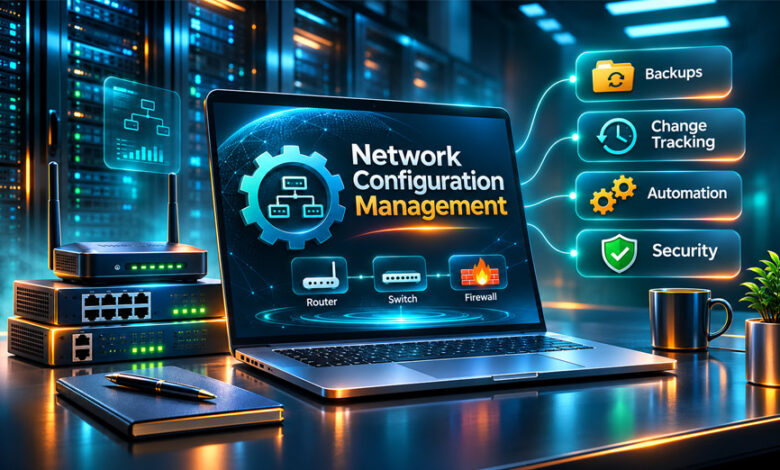

Network Configuration Management, or NCM, helps businesses manage the settings of their network devices. These devices include routers, switches, firewalls, and other network equipment.
Businesses use NCM tools to save settings, track changes, find problems, and restore old configurations when needed.
These tools can also reduce manual work, improve security, and make network management easier.
This guide explains what NCM is, how it works, its main features, popular tools, benefits, and how to choose the right option.
What Is Network Configuration Management?
Network Configuration Management is the process of managing the settings of network devices.
It helps IT teams keep routers, switches, firewalls, and other devices organized and working correctly.
Each network device has settings that control how it works. These may include IP addresses, security rules, routing settings, and access controls.
Managing these settings by hand can be difficult, especially when a business has many devices.
NCM tools make this easier. They can save configuration files, track changes, compare settings, and restore older versions.
For example, if a new router setting causes a problem, an NCM tool can help find the change and restore the old working settings.
NCM also helps businesses keep similar devices under the same basic settings. This can reduce mistakes and make the network easier to manage.
How Does Network Configuration Management Work?
NCM works through several simple steps.
First, the tool finds devices on the network. It may collect details such as device names, IP addresses, manufacturers, and software versions.
Next, it saves the current configuration of each device.
When someone changes a setting, the tool can record the change and compare it with the old version.
If it finds an unexpected change, it may send an alert.
Some NCM tools can also apply the same approved settings to many devices at once.
If a new change causes a problem, the old configuration can be restored.
The main steps are:
- Device discovery: Find devices and collect their details.
- Configuration backup: Save network settings.
- Change tracking: Record updates.
- Drift detection: Find differences between approved and current settings.
- Configuration updates: Apply approved changes.
- Monitoring: Watch for problems or unexpected changes.
- Recovery: Restore an older working configuration.
Some advanced tools can also connect with security tools, automation systems, and other IT software.
Main Features of Network Configuration Management Tools
Most NCM tools include several useful features.
Device Discovery and Inventory
Device discovery helps IT teams find equipment on the network.
The tool may find routers, switches, firewalls, and other devices.
It can also collect details such as IP addresses, device names, manufacturers, and software versions.
This gives IT teams a clear list of their network devices.
Configuration Backup and Recovery
NCM tools can save copies of device settings.
These backups can be created automatically or at planned times.
If a new setting causes a problem, the administrator can restore an older working version.
Backups should still be tested regularly to make sure they can be restored when needed.
Configuration Change Tracking
Change tracking records updates made to network devices.
It may show what changed, when it changed, and who made the change.
This helps IT teams find mistakes and changes made without permission.
It also makes troubleshooting and audits easier.
Configuration Drift Detection
Configuration drift happens when current device settings become different from approved settings.
This can happen because of manual changes or incorrect updates.
NCM tools can compare current settings with approved versions and show the differences.
This helps administrators fix the problem and bring the device back to the correct setup.
Automation and Bulk Configuration
Automation helps IT teams save time.
For example, instead of changing 50 switches one by one, an NCM tool may apply the same setting to all of them.
Some tools also use templates and automated tasks.
However, automatic changes should always be tested first. One wrong setting can affect many devices.
Compliance and Security Checks
NCM tools can check whether network devices follow company security rules.
They may check things such as:
- Password settings.
- Access rules.
- Encryption.
- SNMP settings.
- Routing settings.
- Other security policies.
These checks can help businesses find weak settings and prepare for security reviews.
Reporting and Alerts
NCM tools can create reports about backups, changes, security checks, and device settings.
They can also send alerts when something important changes.
This helps IT teams find problems quickly.
Access Control and Audit History
Not every employee should be able to change network settings.
Access control lets businesses decide who can view or change configurations.
Role-Based Access Control, or RBAC, gives users different permissions based on their jobs.
Audit records also show who made changes and when they happened.
Popular Network Configuration Management Tools
There are several tools that can help with network configuration and monitoring.
Some focus more on backups and changes. Others focus on network monitoring or device discovery.
SolarWinds Observability
Developer: SolarWinds
SolarWinds Observability helps businesses monitor IT systems and network performance.
It gives IT teams a central place to view network information, logs, and performance data.
The collected research also mentions AI-based insights, end-of-life device information, and both self-hosted and SaaS options.
It may be useful for businesses that want a wider view of their IT systems.
ManageEngine Network Configuration Manager
Developer: ManageEngine
ManageEngine Network Configuration Manager helps manage routers, switches, firewalls, and other devices.
Its main features include automatic backups, change tracking, alerts, reports, and rollback options.
It also supports role-based access control.
This tool is more focused on network configuration management than general network monitoring.
Device42
Company: Device42
Device42 helps businesses find and manage IT assets.
Its features include automatic device discovery, network maps, and application connection maps.
It is not mainly a configuration backup tool, but it can help IT teams understand which devices are part of their network.
Domotz Network Configuration Management
Developer: Domotz
Domotz provides network monitoring and configuration tools.
Its features include automatic backups, change alerts, configuration history, and restore options.
It also supports devices from several manufacturers.
This can make it useful for businesses that use equipment from different brands.
BMC TrueSight Automation for Networks
Developer: BMC Software
BMC TrueSight helps businesses automate network configuration tasks.
It can help with change tracking, rollback, security checks, reports, and network updates.
It is mainly suited to larger businesses with many devices.
rConfig
Developer: rConfig
rConfig is a network configuration management tool.
It supports automatic backups, configuration comparison, rollback, APIs, encryption, LDAP, and single sign-on in some editions.
It can be useful for both smaller and larger network teams.
Paessler PRTG
Developer: Paessler
PRTG is mainly a network monitoring tool.
It can find devices, monitor performance, send alerts, and show network activity.
It is not a full NCM tool, but it can still help IT teams watch network performance and find problems after changes.
Best Network Configuration Management Tools Compared
Different tools are made for different jobs.
| Tool | Main Purpose | Best For |
|---|---|---|
| SolarWinds Observability | IT and network monitoring | Businesses needing wider network visibility |
| ManageEngine NCM | Backups and change tracking | IT and network teams |
| Device42 | Device discovery and inventory | Businesses managing many IT assets |
| Domotz | Monitoring and configuration backups | IT teams and service providers |
| BMC TrueSight | Network automation | Large businesses |
| rConfig | Configuration backups and management | Small and large network teams |
| PRTG | Network monitoring | Businesses needing performance monitoring |
ManageEngine and rConfig focus more directly on configuration management.
PRTG mainly focuses on network monitoring, while Device42 focuses more on device discovery and asset management.
Businesses should check current features, pricing, and device support before choosing a tool.
Benefits of Network Configuration Management Tools
NCM tools can make network management easier and safer.
Less Network Downtime
Backups and recovery tools help restore old settings if something goes wrong.
This can help reduce downtime.
Fewer Mistakes
Manual changes can lead to errors.
Templates and automation can help reduce these mistakes.
Better Network Security
NCM tools can find unsafe settings and changes made without permission.
They also help businesses keep clear records of important updates.
Easier Troubleshooting
If a problem happens, administrators can check what changed.
They can compare old and new settings and restore a working version if needed.
Saves Time
Automation reduces repeated manual work.
IT teams can schedule backups, apply settings, and create reports automatically.
Consistent Settings
Standard templates help similar devices use the same basic settings.
This makes the network easier to manage.
Better Compliance
NCM tools can check whether devices follow company rules and security requirements.
They can also create reports for reviews and audits.
Challenges and Limitations of NCM Tools
NCM tools are useful, but they also have some limits.
- Setup can take time.
- Some tools can be expensive.
- Not every tool supports every device brand.
- Employees may need training.
- Wrong automated changes can affect many devices.
- Backups must be protected and tested.
- Some tools may be difficult to connect with existing systems.
- Large networks need careful planning.
NCM tools cannot stop every network problem.
Hardware failures, internet outages, and other technical problems can still happen.
Businesses should use NCM together with monitoring, security, and recovery tools.
Network Configuration Management and Network Security
Network security is an important part of NCM.
Wrong settings can create security risks.
For example, weak passwords, open access rules, and old firmware can make devices easier to attack.
NCM tools help administrators find these problems and track changes.
Firmware Management
Firmware is the software that controls a network device.
Routers, switches, and firewalls need the right firmware to work properly.
Old firmware may contain security problems.
NCM tools can help IT teams check firmware versions and find devices that need updates.
Updates should be tested before they are installed.
Access Control
Access control decides who can view or change network settings.
Businesses should only give users the access they need.
Admin access should be limited to trusted users.
NCM tools with RBAC can help control these permissions.
Configuration Auditing
Configuration auditing checks whether devices follow approved settings.
It can find weak settings, unexpected changes, and security problems.
Audit records can also show who made a change and when.
Network Configuration Management vs. Network Monitoring
NCM and network monitoring are related, but they are not the same.
NCM manages device settings and changes.
Network monitoring checks network performance and availability.
| Network Configuration Management | Network Monitoring |
|---|---|
| Manages device settings | Checks network performance |
| Saves backups | Checks if devices are working |
| Tracks changes | Monitors activity |
| Finds setting differences | Finds performance problems |
| Restores old settings | Finds service problems |
| Checks configuration rules | Checks network health |
Businesses may need both tools.
NCM helps manage settings, while network monitoring helps check how well the network is working.
How to Choose the Right Network Configuration Management Tool
The right NCM tool depends on your network and business needs.
Device Compatibility
Make sure the tool supports your routers, switches, firewalls, and other devices.
If you use different brands, choose a tool with multi-vendor support.
Backup and Recovery
Choose a tool that can create regular backups and save older versions.
It should also make it easy to restore settings.
Automation Features
Look for useful automation features such as scheduled backups, templates, and bulk updates.
Security and Access Control
The tool should support user permissions, RBAC, secure login details, and audit records.
Reporting and Alerts
Choose a tool with clear reports and useful alerts.
These can help IT teams find problems faster.
Pricing and Licensing
Compare prices and plans carefully.
Some tools offer free versions or trials, while others require paid licenses.
Check device limits and included features.
Scalability and Integrations
Choose a tool that can grow with your business.
Also check whether it can connect with your current IT systems and security tools.
How to Implement Network Configuration Management
Setting up NCM requires good planning.
Step 1: Review Your Network
Make a list of your routers, switches, firewalls, locations, and software versions.
Step 2: Set Clear Goals
Decide what you want to improve.
This may include backups, security, change tracking, or recovery.
Step 3: Choose the Right Software
Compare tools based on features, price, device support, and ease of use.
Step 4: Test the Software
Start with a small number of devices.
Make sure the tool can find them, save settings, and create backups.
Step 5: Create Standard Templates
Create approved settings for different device types.
This helps keep devices consistent.
Step 6: Set User Permissions
Give users access based on their jobs.
Only trusted users should be allowed to make important changes.
Step 7: Enable Automatic Backups
Create a regular backup schedule.
Make sure backups are stored safely.
Step 8: Set Up Alerts
Turn on alerts for unexpected changes, backup failures, and other problems.
Step 9: Train Your IT Team
Make sure staff understand how to use the tool correctly.
Step 10: Check the Results
Review whether the tool is saving time and helping the team manage the network better.
Network Configuration Management Best Practices
Good NCM practices can help reduce problems.
- Keep device records updated.
- Use standard templates.
- Create regular backups.
- Test backup recovery.
- Record important changes.
- Review user permissions.
- Check for unexpected configuration changes.
- Keep firmware updated.
- Protect backup files.
- Test automated changes first.
- Train IT staff.
- Review reports regularly.
For large networks, it is also useful to separate the people who create, approve, and apply important changes.
Five Main Functions of Configuration Management
Configuration Management has five main functions.
1. Configuration Management Planning and Management
This means planning how configurations will be managed.
It includes setting goals and giving people clear responsibilities.
2. Configuration Identification
This means finding and recording the devices that need to be managed.
It can include routers, switches, firewalls, software versions, and settings.
3. Configuration Change Management
This controls changes made to network settings.
Changes should be checked, approved, recorded, and applied carefully.
4. Configuration Status Accounting
This keeps records of configuration versions and their current status.
It helps IT teams understand which settings are being used.
5. Configuration Verification and Audit
This checks whether settings are correct and follow approved rules.
It can help find missing settings, wrong changes, and security problems.
Common Network Configuration Problems
NCM tools can help find and fix several common problems.
Configuration Drift
Configuration drift happens when current settings become different from approved settings.
Solution: Compare the settings and fix any unexpected changes.
IP Address Conflicts
This happens when two devices use the same IP address.
Solution: Check IP records and avoid duplicate addresses.
Incorrect VLAN Settings
Wrong VLAN settings can stop devices from communicating.
Solution: Check the VLAN settings and compare them with the network plan.
Missing Configuration Backups
Without a backup, restoring a device can be difficult.
Solution: Create automatic backups and test them regularly.
Unauthorized Configuration Changes
Someone may change network settings without permission.
Solution: Use access control, tracking, and alerts.
Outdated Firmware
Old firmware may have security or compatibility problems.
Solution: Check firmware versions and install suitable updates after testing.
Failed Configuration Updates
A new setting may cause a device to stop working correctly.
Solution: Test changes first and keep a working backup.
Who Needs Network Configuration Management Tools?
NCM tools can help many types of businesses and IT teams.
- Small businesses: For basic backups and settings.
- Medium businesses: For managing more devices.
- Large businesses: For large networks across many locations.
- Network administrators: For tracking changes and settings.
- Network engineers: For automation and troubleshooting.
- Managed service providers: For managing customer networks.
- Security teams: For checking unsafe settings.
- Data center teams: For managing many network devices.
Small businesses may only need simple backup features.
Large businesses may need advanced automation, reports, multi-vendor support, and central management.
Bottom Line
Network Configuration Management tools help businesses manage network settings, save backups, track changes, and find problems.
Tools such as ManageEngine, SolarWinds, Domotz, rConfig, and PRTG offer different features.
There is no single best tool for every business.
The right choice depends on your network size, devices, budget, and the features you need.
A good NCM system can reduce manual work, lower the risk of mistakes, improve security, and make network recovery easier.
Frequently Asked Questions
What is a Network Configuration Management tool?
It is software that helps manage network settings, save backups, and track changes.
What are the best Network Configuration Management tools?
Popular tools include ManageEngine, SolarWinds, Domotz, rConfig, and BMC TrueSight.
What are the main features of NCM software?
Main features include backups, change tracking, automation, alerts, and reports.
Is Network Configuration Management the same as network monitoring?
No. NCM manages device settings, while network monitoring checks network performance.
Can NCM tools automatically back up network configurations?
Yes. Many NCM tools can save network settings automatically.
How does NCM improve network security?
It finds unsafe settings, tracks changes, and controls who can access devices.
Are there free Network Configuration Management tools?
Yes. Some tools offer free versions or trials with limited features.
How often should network configurations be backed up?
Backups should be made regularly, especially after important network changes.
MyFastBroker.com: What It Is, How It Works, and Is It Legit?