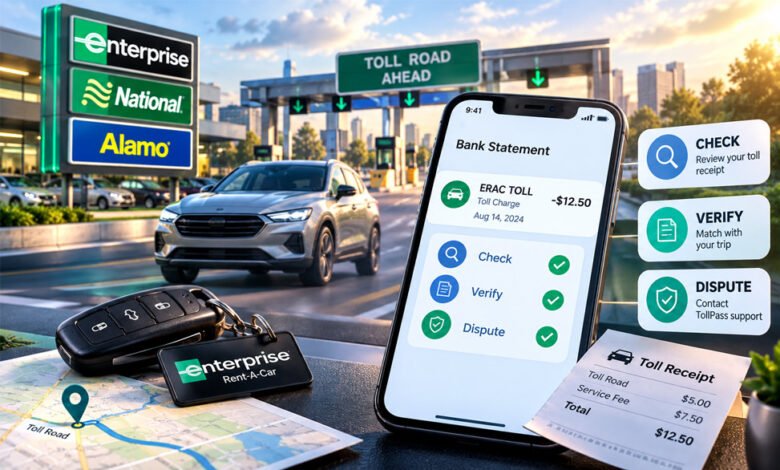

Eractoll is a term people often search after seeing ERAC TOLL on a bank or credit card statement. The charge is commonly linked to toll road use during an Enterprise Rent-A-Car rental.
The charge may appear weeks after the rental has ended. This can make it difficult to recognize. This guide explains what Eractoll means, how Enterprise TollPass works, what the charge may include, and how you can check it.
What Is Eractoll?
Eractoll usually refers to an ERAC TOLL transaction connected with Enterprise Rent-A-Car. ERAC is commonly used as a short form of Enterprise Rent-A-Car.
The charge can appear when a rental vehicle uses a toll road, bridge, tunnel, or electronic toll lane. Many toll roads no longer require drivers to stop and pay cash. Instead, the system can identify a vehicle using its license plate or a toll transponder.
The toll information can then be connected with the rental agreement. The payment method linked to the rental may be charged later.
Seeing ERAC TOLL on a statement does not by itself prove that every charge is correct. The dates, toll locations, rental details, and amounts should match a real rental and trip.
Enterprise is part of the same rental-car group as National Car Rental and Alamo Rent A Car. If you do not immediately remember an Enterprise rental, it can therefore be useful to check whether you recently rented through one of these related brands.
Why Did You Get an ERAC TOLL Charge?
An ERAC TOLL charge normally appears because a rental vehicle passed through an electronic toll point and the toll was not paid using another accepted method.
This can happen without the driver stopping anywhere. Modern toll systems often use cameras to read license plates. Other systems use electronic transponders installed in or connected with the vehicle.
After the toll is recorded, the vehicle information can be matched with the person who rented the car at that time. The toll can then be billed to the payment method connected with the rental agreement.
For example, you may drive through a cashless bridge or express lane without seeing a normal toll booth. The road can still record the vehicle and create a toll charge.
This is why an ERAC TOLL transaction does not necessarily mean that you agreed to a separate purchase while driving. It may simply be the later billing of a toll used during the rental.
How Enterprise TollPass Works
Enterprise uses TollPass to handle electronic toll payments in supported areas.
When a rental vehicle passes through an eligible toll point, the road system can identify the vehicle by its plate or a transponder. The toll authority processes the transaction and sends the information through the toll billing system.
The toll can then be matched with the rental agreement. The payment method connected with the rental may be charged for the toll and any applicable TollPass fee.
This system is useful on cashless roads because drivers do not always have the option to stop and pay at a booth.
TollPass rules are not exactly the same everywhere. Available payment methods, coverage, toll rates, and fees can depend on the road, state, country, and rental location. Renters should check the terms for their specific rental instead of assuming the same rules apply everywhere.
What Does an Eractoll Charge Include?
An Eractoll transaction may be more than the basic road toll. It can include the actual toll amount and an applicable TollPass convenience or service fee.
The toll itself is set according to the rules of the toll road or authority. Rates can differ depending on the road, location, vehicle, time, and payment method.
In some cases, tolls processed through a rental program may use a video toll, cash, or undiscounted rate. This can be higher than the discounted price available to a driver who has their own local toll account.
A convenience fee may also apply for using the rental company’s toll service. Some programs charge this fee for each day that a toll is used, up to a stated rental-period limit.
Exact TollPass prices are not universal. They can change by location and rental terms. Because of this, the best way to understand the total is to check the terms of your rental and the itemized toll record.
This also explains why the amount on your bank statement may be higher than the toll price you remember seeing on a road sign.
Why Does Eractoll Appear Weeks Later?
An Eractoll charge may not appear immediately after you use a toll road.
The toll authority first needs to process the vehicle information. This can include license-plate images, transponder records, dates, locations, and other toll data. The information then needs to reach the system responsible for the rental vehicle.
Enterprise has reported that toll-related charges can commonly appear around four to six weeks after a rental, although the actual time can vary.
This delay is one of the main reasons people do not recognize ERAC TOLL on their statements. The rental may already feel finished by the time the charge arrives.
If you see an unfamiliar Eractoll transaction, check rentals from the previous several weeks rather than looking only at your most recent purchases.
How to Check an Eractoll Charge
Start with your rental agreement. Check the rental dates, vehicle information, and payment method.
Next, think about the route you drove. Check whether you used any toll highways, bridges, tunnels, cashless roads, or express lanes during the rental.
Do not decide whether the charge is correct based only on the total amount. One transaction may include several tolls and applicable service fees.
You should compare:
- The rental dates
- The toll dates
- The roads or toll locations
- The vehicle or rental agreement
- The payment card used for the rental
- Any tolls you paid separately
If these details match your trip, the charge is more likely to be connected with your rental. If something does not match, keep the records so you can investigate it further.
How to Find Your Toll Receipt
An itemized toll receipt is one of the most useful ways to understand an ERAC TOLL charge.
Enterprise directs renters to its toll receipt system for eligible TollPass records. Instead of showing only a short bank statement description, the toll record can provide details about the individual toll transactions.
You may be able to search using your last name and rental agreement or contract number. If you no longer have the agreement number, the receipt system may provide another lookup method using your last name and limited digits from the payment card used for the rental.
Once you find the record, check the toll dates, locations, individual amounts, and any related fees.
Compare these details with the route you actually drove. If the toll locations and dates match your rental, you will have a much clearer explanation for the Eractoll charge.
If the information does not match, save a copy of the toll record and your rental agreement. These documents can be useful when you verify or dispute the charge.
What If You Used Your Own Toll Pass?
You may have used your own E-ZPass, SunPass, FasTrak, or another toll account with the rental car. In some areas, this can be an alternative to the rental company’s toll service.
However, you need to follow the rules of the toll system you are using. Some systems require you to add the rental car’s license plate to your account. You may also need to enter the start and end dates of the rental.
Problems can happen if the plate number was entered incorrectly or the vehicle was not properly linked to your account.
If your personal toll account shows that you already paid the toll but you also received an Eractoll charge for the same toll, keep your toll statement. It can help you show that the payment was already made.
How to Verify Whether the Charge Is Correct
Do not judge an Eractoll charge only by its name or amount. Check the details behind it.
Compare the toll record with your rental dates and the places you visited. The toll date should fall within the period when you had the rental vehicle.
Check the location as well. If the statement lists a road, bridge, or toll area that you did not visit, the charge may need further review.
Also look for duplicate tolls. If you used your own toll account, compare its statement with the Eractoll record to see whether the same toll appears on both.
Your rental agreement, toll receipt, and personal toll records can help you verify what happened. Save copies if you find anything that does not match.
How to Dispute an Eractoll Charge
If you believe an Eractoll charge is incorrect, collect the details before starting a dispute.
First, get the itemized toll record if available. Identify the exact toll you believe is wrong. Note its date, location, and amount.
Then contact TollPass support through an official Enterprise or TollPass channel. Give your rental agreement number when possible and clearly explain why you believe the charge is incorrect.
Useful proof may include:
- Your rental agreement
- The itemized toll receipt
- A personal toll-tag statement
- Proof that you paid the toll another way
- Travel records that help show where you were
For example, if your E-ZPass statement shows that a toll was already paid, provide the record for the same date and location.
If the toll service does not resolve a clear billing problem, you can contact your card issuer and ask about its dispute process.
Avoid sending full credit card or banking details through a normal email. Use official support methods when sharing payment-related information.
Is Eractoll Legit or a Scam?
An ERAC TOLL transaction is commonly connected with rental-car toll processing. Seeing this name on your statement does not automatically mean someone has used your card fraudulently.
At the same time, you should check any payment you do not recognize.
A charge may need more investigation if you had no matching rental, the toll date does not fit your rental period, or the toll record shows a road you never used.
Duplicate payments are another reason to check. This may happen if your personal toll account appears to have paid the same toll that was later included in the rental toll bill.
Use official Enterprise or TollPass contact information when checking a charge. Avoid phone numbers or links from unknown emails, text messages, social media posts, or other untrusted sources.
If there is no rental or toll record that explains the transaction, contact your card issuer and follow its process for reporting an unknown charge.
How to Avoid Surprise Toll Charges
Before driving a rental car, check whether your planned route includes toll highways, bridges, tunnels, or express lanes. Some toll roads are fully cashless.
Ask the rental location how toll payments work in that area. Find out whether TollPass applies and whether there are extra convenience fees.
If you want to use your own transponder, check whether it is accepted. Make sure the rental vehicle is correctly added to your toll account if the toll provider requires it.
Keep your rental agreement after returning the vehicle. Do not throw it away as soon as the rental ends because toll charges may arrive several weeks later.
It is also useful to save toll receipts and records from your personal toll account. These records make it easier to check a later Eractoll charge.
Bottom Line
Eractoll usually refers to an ERAC TOLL charge related to electronic toll use during a rental. The payment may include the road toll and an applicable service or convenience fee.
The charge can appear weeks after the vehicle has been returned, which is why it may look unfamiliar.
If you see an Eractoll transaction, check your rental agreement and itemized toll record. Compare the dates and locations with your trip. If something does not match, gather your records and contact official TollPass support.
Frequently Asked Questions
What does Eractoll mean on a bank statement?
Eractoll or ERAC TOLL is usually a toll charge from an Enterprise rental car.
Why did Enterprise charge me for a toll?
You may have used a toll road during your rental. The toll can be recorded automatically and charged later.
How long after a rental can an Eractoll charge appear?
The charge may appear around four to six weeks after your rental. The exact time can vary.
Why is my Eractoll charge higher than the road toll?
The total may include the road toll plus a service or convenience fee.
How can I find my Enterprise toll receipt?
You can check your toll receipt through the official Enterprise TollPass system using your rental details.
What if I already paid the toll with my own E-ZPass?
Check your E-ZPass statement. If you were charged twice, keep the proof and contact TollPass support.
How do I dispute an Eractoll charge?
Check the toll details and collect your rental and payment records. Then contact official TollPass support.
Is an Eractoll charge fraudulent?
Not always. It is usually a rental toll charge, but you should check it if you do not recognize the rental or toll.
Blazertje: Meaning, Features, Popular Styles, and Outfit Ideas
What Is an RLP Letter? Legal Status, Payment Rules, and Your Options