
The call center metrics that show where you’re losing customers are missed calls, abandoned calls, wait time, service level and repeat calls. Together, they show the moments a customer gave up, waited too long or had to call back because the first call didn’t fix anything.
Total call volume and average talk time won’t show you those moments. The losses hide inside averages, so the useful view breaks every metric down by phone number, team and time of day.
Why Do Some Call Center Metrics Hide the Problem?
Most dashboards open with big totals: calls handled today, average call length, agents online. Those numbers describe activity, but they don’t tell you who hung up before anyone answered.
Averages make it worse. A queue can show a reasonable average wait while a handful of callers sat on hold long enough to give up, and those are the customers you lost.
The fix is to watch metrics that count failures, not just volume. Then look at the worst cases alongside the averages, because the worst cases are where customers leave.
Which Call Center Metrics Show Customers Giving Up?
Three metrics capture the moment a customer stops trying. Each one points to a different cause, so track them separately.
1. Missed Calls
A missed call is an inbound call nobody answered. It rang out, hit voicemail or ended without reaching a person.
Track missed calls as a count and as a percentage of inbound calls, then break them down by number and time of day. A spike at lunch or late in the afternoon points to a staffing gap, not a lack of effort.
2. Abandoned or Dropped Calls
An abandoned call is one where the caller hung up before an agent picked up, while waiting in a queue or a phone menu. Some systems label these dropped calls, meaning the call disconnected before it was completed.
This is the clearest sign of a lost customer. Someone wanted to talk to you, waited and decided it wasn’t worth it.
3. Wait Time and Longest Wait
Average wait time tells you how long callers sit in the queue before an agent answers. Longest wait tells you how bad it got for the person who waited most.
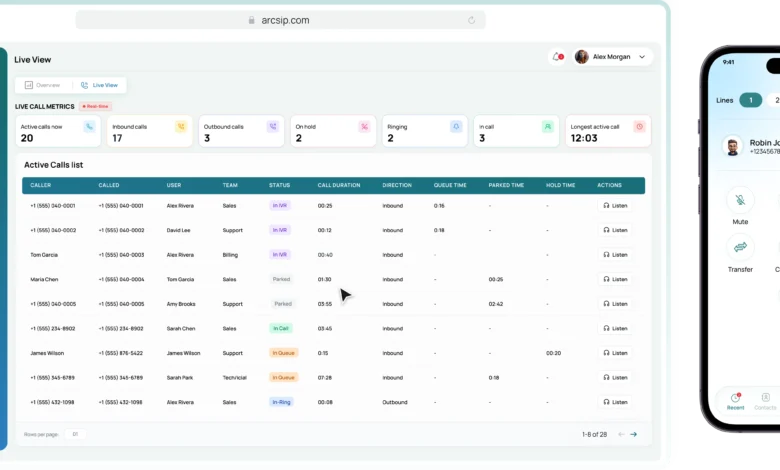
The longest wait is the more honest number of the two. A cloud contact center can show the longest wait in queue as it happens, so a supervisor sees a backlog forming while there’s still time to move agents onto the line. By the time the same problem shows up in a weekly report, those callers are already gone.
4. Time in the Phone Menu
A phone menu that’s too long or confusing loses callers before they ever reach the queue. Watch how many calls are sitting in the menu at busy times and how many end there without reaching anyone.
Callers who hang up inside the menu never reach an agent, so check whether your reports count them as missed or dropped calls. This is one of the easiest losses to overlook and one of the cheapest to fix, by cutting options or putting the most common one first.
How Does Service Level Show Whether You’re Keeping Up?
Service level is the percentage of calls answered within a target time you choose. It turns “are we answering fast enough?” into a single number you can track every day.
The target depends on your business and your customers’ patience. A clinic’s booking line and a software company’s billing line won’t need the same answer time, and on a unified communications platform each number and team can carry its own target instead of one figure for the whole company. That way a slow afternoon on one line doesn’t hide behind a good day on another.
Watch call center service level alongside abandoned calls. If service level drops and abandoned calls rise in the same hours, you’ve found the exact window where you’re losing people.
Which Metrics Show Customers Who Got Through but Still Left Unhappy?
Answering the call is only half the job. A customer who reached an agent can still leave frustrated, and these metrics show where that happens.
1. Average Handle Time
Average handle time measures how long an agent spends on a call from start to finish, including talk time, hold time and any wrap-up work afterwards. It shows how much agent time each type of call needs.
Treat it as a planning number, not a target to push down. Agents rushed to cut handle time end calls before the problem is solved, and those customers call back.
2. Hold Time
Long or repeated holds tell you an agent didn’t have what they needed. The missing piece is information about the customer, a quick answer from a colleague or access to the right system.
Track the longest hold alongside the average. A single caller left on hold long enough to give up costs you more than a slightly higher average.
3. Transfers
Every transfer asks the customer to wait again and often to repeat themselves. A call that bounces between departments is a sign of routing that sends people to the wrong place first.
Transfers are easier to see when every department works from the same system. When the front desk, sales and support share one phone system, each call keeps a record of every step it took, including transfers and fallbacks with a timestamp and a reason. That record shows exactly where callers get passed around and which routing rule to fix.
4. Repeat Calls and First Call Resolution
First call resolution measures how often a customer’s issue gets solved on the first call. It’s one of the strongest signs of a good experience, and one of the hardest to measure precisely.
Start with repeat calls. Search your call history for customers who called back about the same issue, and use post-call outcomes and notes to see which call types keep coming back.
What Customer Experience Metrics Sit Outside the Phone System?
Call metrics show what happened on the line. Customer experience metrics show how the customer felt about it.
The common ones are:
- Customer satisfaction (CSAT): a short survey asking how satisfied the customer was with a specific interaction
- Net Promoter Score (NPS): how likely a customer is to recommend you, measured across the whole relationship
- Customer effort: how easy it was for the customer to get their problem solved
These usually come from survey or feedback tools rather than the phone system. Read them next to your call metrics, because a falling satisfaction score with rising hold times tells a clearer story than either one alone.
How Should You Read a Call Center Dashboard?
A call center dashboard is only useful if it answers a specific question. Before you look at it, decide what you’re checking: today’s backlog, a team’s performance or a problem that keeps recurring.
Use these views to narrow it down:
- By phone number: shows which line, campaign or location is losing callers
- By team: shows whether one queue is understaffed compared with the rest
- By agent: shows availability and workload, so you can spot who’s overloaded or on break during a rush
- By time of day: shows the exact hours when missed and abandoned calls cluster
Set alert levels for the metrics that need action the same day, such as longest wait, missed calls and service level. A dashboard that only gets checked at the end of the week turns every problem into a report about customers you’ve already lost.
Separate live views from historical ones. Live metrics like calls in queue and longest wait help you act now, while daily and weekly views show the patterns behind recurring problems.
Which Call Center KPIs Should a Small Team Start With?
A small team doesn’t need dozens of call center KPIs. It needs a short list it checks every day and acts on.
Start with these:
- missed calls, as a count and a percentage
- abandoned or dropped calls
- service level against your answer-time target
- longest wait in queue
- repeat calls from the same customers
Give each metric an owner. A supervisor watches the live numbers during the day, while a manager reviews the weekly trends and decides what to change in staffing, routing or business hours.
Add handle time, hold time and transfers once the first five are under control. Review them weekly by number and team, and change one thing at a time so you can see what actually worked.
The Metrics That Matter Count the Customers You Lost
Call volume and talk time describe how busy your team is. Missed calls, abandoned calls, long waits and repeat calls describe the customers who gave up on you.
Track the failures, look at the worst cases rather than only the averages and break everything down by number, team and time of day. That’s where the lost customers show up, and it’s where the fixes start.