
In live event production, attendees see only the polished keynote. Behind the curtain, forty people are counting down to it: a camera operator waits for a tally light while a stagehand steadies the lectern. What keeps them in step is a single document.
An event run of show is the minute-by-minute script for everyone who makes the program happen, and it differs from the agenda guests receive. This article explains how to map the segments, write the cues, rehearse the transitions and steer the show once doors open.
Define the Event Segments and Major Milestones
Planners often start with the keynote and work outward, which leaves load-in and changeovers underestimated. So begin with the full span of the venue booking. Below is how to lay out the event timeline and spot the moments where time tends to disappear.
List Every Segment From Load-In to Breakdown
Picture the engagement as three nested layers. The event production schedule covers days: truck arrivals, rigging, lighting focus, programming, rehearsals and load-out. Within it sits the show itself, timed in minutes. Individual cues form the innermost layer, counted in seconds.
Draft the outermost tier first. Rigging always goes in before lighting and video, since truss and motors must fly before anything hangs from them. Mark hard limits as well, such as the venue curfew or the hour when union crew calls shift into overtime, because those fixed points shape everything else.
Identify the Transitions That Need Extra Time
Changeovers are where minutes vanish. A five-person panel requires chairs on spike marks and freshly fitted lavalier mics. A band following a speaker calls for a line check. Award segments depend on trophies staged and presenters cued from the correct wing.
Time each changeover during rehearsal instead of guessing. Then decide what the audience sees while the crew works: a sponsor video, perhaps, or walk-in music under a lighting look.
Turn the Event Agenda Into a Working Run of Show
With segments and transitions mapped, the next task is to convert a guest-facing program into something the crew can execute. Attendees care only about start times. Operators require every block split into individual moves, each tied to an owner and a cue. Below, we’ll cover what a row should record and how buffers shield the schedule from overruns.
Record Timings, Cues, and Responsible Owners
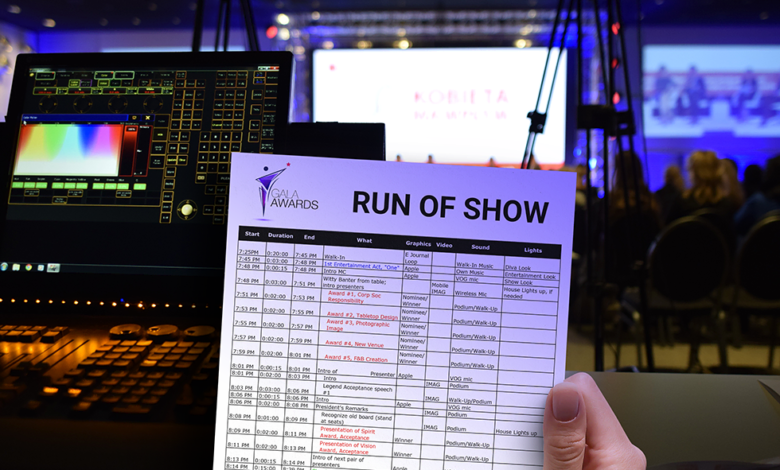
Spreadsheets work for smaller programs; cloud rundown tools such as Rundown Studio or Shoflo add live timers and shared editing for larger ones. Whatever the format, each row is one moment, and the columns typically include:
- Clock time, duration and running time.
- Segment title and stage position.
- Talent on stage and their microphone assignment.
- Lighting cue number.
- Video source or playback file name.
- Audio cue, including walk-up music.
- Scenic or stage moves.
- Owner for that row, plus notes.
Number cues by department, with prefixes like LX for lighting and SQ for sound. Late additions get decimals, so a new effect between cue 14 and cue 15 becomes 14.5 and nothing downstream needs renumbering.
Build in Buffers for Rehearsals and Changes
Tag every segment as hard or soft. Hard items, such as a broadcast feed or a sponsor commitment, start on time no matter what. Flexible ones, like a sizzle reel or an extra panel question, can shrink when the program runs long.
Place small cushions before meal breaks and after keynotes, where overruns are most common. Protect rehearsal blocks with the same discipline; once they get squeezed, unsolved problems simply reappear in front of the audience.
Coordinate Technical Cues With Production Teams
Four departments (audio, lighting, video and staging) must hit every cue on the same beat, and on a multi-day program that coordination can quickly overwhelm an in-house team. For this reason, many organizers hand the technical side to an experienced event production company. Such a partner arrives with a trained show caller and operators fluent in the same shorthand. Here’s how professionals keep each crew in sync with what the audience sees.
Sync Audio, Lighting, Video, and Stage Movements
Strong event show calling works in two steps. The first is a warning, for example “Standby lights 22 and video 8,” which gives each operator time to load the right cue. Seconds later, the word “go” triggers both departments at once. Grouped this way, a presenter’s entrance and the spotlight pickup arrive on the same beat.
Stage managers handle the physical side of those audiovisual cues. They keep speakers in the wings until the deck is clear and the mic is live, then send them out on the caller’s word. A downstage countdown clock and confidence monitors let presenters track remaining time and upcoming slides without turning away from the room.
Establish One Source of Truth for Last-Minute Updates
Conflicting versions can derail a show as fast as a failed projector. Give one person, usually the producer, editing rights to the master file. Label each revision with a time stamp (“v7, 14:30”), and print copies on a different paper color for each round, a habit borrowed from film script revisions. Announce changes over the intercom and wait for every department to acknowledge them before moving on.
Stress-Test the Schedule Before Doors Open
Plans look finished until real operators execute them at speed. Below are two ways to find the weak spots while a fix is still cheap.
Run Cue-to-Cue and Full Technical Rehearsals
A cue-to-cue skips the content and jumps between transitions. Operators practice handoffs, and the caller hears which standbys arrive too late.
A full event technical rehearsal follows, in real time and with talent. Ask each presenter to walk on, use the clicker, read the confidence monitor and exit. Record actual durations, then update the grid that night.
Prepare Decision Rules for Delays or Cancellations
Agree beforehand who can cut content and in what order. A short priority list, for example dropping audience Q&A before touching a sponsored segment, saves arguments on headset when the clock is against you.
Script a show-stop procedure too. Program audio gets muted and house lights come to full before the booth reads a prepared announcement. The venue’s emergency plan governs everything after that, so review it with the building’s operations lead in advance meetings.
Use the Run of Show as a Live Control Document
A run of show keeps working after rehearsals end. Once doors open, it becomes the crew’s scoreboard: a timekeeper logs when each segment actually begins and reports any delay over headset. If the program falls behind, the producer can trim a soft item early, before the overrun spreads into lunch or the closing keynote.
When the last guest leaves, archive the annotated event day timeline. Its recorded durations reveal which changeovers dragged and which speakers overran, data no template can supply. Build the next event’s document from that file, and each future show will begin closer to reality.