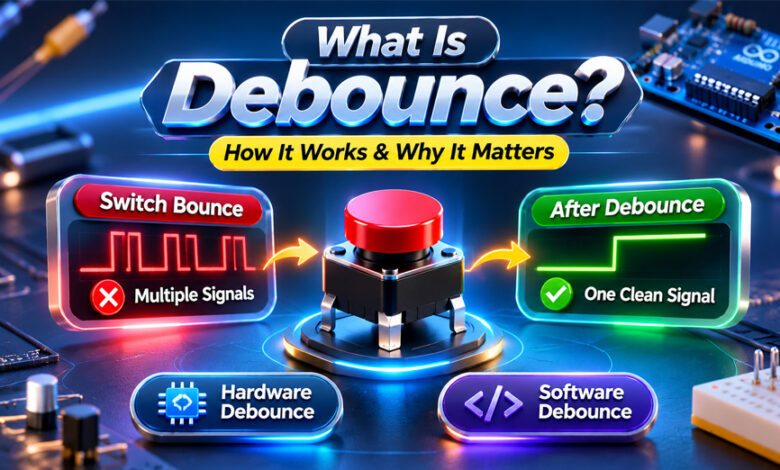

Debounce is a way to make buttons and switches work more correctly. When you press a mechanical button, it may create several quick signals instead of one clean signal. This is called switch bounce.
Debouncing removes or ignores these extra signals. It is often used with Arduino, microcontrollers, keypads, control panels, and other electronic devices. This guide explains what debounce is, how it works, its main types, and why it is useful.
What Is Debounce?
Debounce is a method used to remove unwanted signals from a mechanical button or switch. It helps an electronic system understand when a button has really been pressed or released.
A mechanical switch does not always change from OFF to ON in one clean step. Its contacts may quickly connect and disconnect several times before they become stable.
A microcontroller can detect these small changes. It may think that one button press is actually several presses.
Debouncing solves this problem. It ignores the extra changes and accepts the button state only when the signal becomes stable.
There are a few related terms to understand.
Switch bounce is the problem caused by the physical contacts inside a switch.
Debouncing is the method used to solve this problem.
A debounce circuit uses electronic parts to clean the signal.
Debouncing can also be done with software, so a separate circuit is not always needed.
What Is Switch Bounce?
Switch bounce is also called contact bounce or button bounce. It happens inside mechanical buttons and switches.
When you press a button, two electrical contacts move together. They may touch, separate, and touch again very quickly before making a stable connection.
The signal may look like this:
OFF → ON → OFF → ON → OFF → ON
A person still sees this as one button press. However, a fast microcontroller may detect each change.
Switch bounce can also happen when you release a button. This means both button presses and releases may need debouncing.
Not every switch has the same amount of bounce. It can depend on the type, quality, age, and condition of the switch.
Why Is Debouncing Important?
Debouncing helps electronic systems read buttons correctly.
Imagine that a button controls a counter. You press it once and expect the number to move from 5 to 6. Without debounce, the system could detect several quick signals and count the same press more than once.
The same problem can happen in menus, keypads, relays, and other controls. One press could cause several unwanted actions.
Debouncing helps the system understand which signal is a real button action and which signals are only caused by contact bounce.
It is commonly useful in Arduino projects, microcontrollers, embedded systems, digital counters, keypads, and control panels.
However, debounce does not fix every electrical problem. Other types of electrical noise may need different solutions.
How Does Debounce Work?
Debounce works by ignoring quick and unstable changes from a button.
In software debouncing, the microcontroller first reads the button. When the button state changes, the program checks whether the new state stays stable for a short time.
If the signal keeps changing, the program does not accept it yet.
Once the signal stays stable long enough, the program accepts the new button state. It can then perform an action, such as turning on an LED, moving through a menu, starting a motor, or increasing a counter.
Hardware debounce works differently. It uses electronic components to clean the signal before the digital system reads it.
The basic process is:
Button changes → signal bounces → debounce removes or ignores the bounce → stable signal is accepted → action happens.
A good debounce system should also know the difference between holding a button down and pressing it again.
What Is Debounce Time?
Debounce time is the short period used to check if a button signal has become stable.
The Arduino examples in this guide use 50 milliseconds (ms).
When the button changes state, the program checks whether it stays in that state for the required time. If it does, the new state is accepted.
However, 50 ms is only an example. It is not the correct value for every switch.
If the debounce time is too short, some unwanted signals may still get through.
If it is too long, the button may feel slow or may not handle very quick presses well.
The best debounce time depends on the switch and how the button is being used.
Types of Debouncing
There are two main ways to debounce a switch: hardware debouncing and software debouncing.
Hardware Debouncing
Hardware debouncing uses electronic parts to clean the button signal.
Common parts and methods include resistors, capacitors, RC circuits, Schmitt triggers, logic gates, and flip-flops.
An RC circuit uses a resistor and capacitor to smooth quick changes in the signal. A Schmitt trigger can then help turn the changing signal into a cleaner digital input.
The main benefit of hardware debounce is that the signal can be cleaned before the main program reads it.
However, it requires extra electronic parts. This may increase the cost, circuit size, and complexity.
Software Debouncing
Software debouncing uses code instead of extra debounce hardware.
The program reads the button and watches for changes. When it finds a change, it waits until the signal is stable before accepting it.
Software debounce is common in Arduino and other microcontroller projects because it is easy to change. Developers can adjust the debounce time by changing the code.
A simple program may use a delay. More advanced programs can use timers or state tracking so the microcontroller can continue doing other work.
Software debounce still needs the correct settings. A very short debounce time may not remove all switch bounce. A very long time may make the button slow.
Hardware vs Software Debounce
Both methods can solve switch bounce, but they work in different ways.
| Feature | Hardware Debounce | Software Debounce |
|---|---|---|
| Extra parts | Usually needed | Usually not needed |
| Programming | Not needed for filtering | Needed |
| Changing timing | Less flexible | Easy |
| Board space | Uses extra space | Little extra hardware |
| Extra hardware cost | Possible | Usually none |
| Works without program code | Yes | No |
| Common use | Electronic circuits | Microcontroller projects |
Software debounce is useful when a microcontroller is already reading the button.
Hardware debounce can be better when the signal needs to be cleaned before it reaches the main digital system.
Some projects use both hardware and software debounce. The right choice depends on the project and how reliable the button needs to be.
Arduino Button Debounce
Push buttons are common in Arduino projects. They can control LEDs, motors, menus, counters, displays, and many other functions.
A button is normally connected to a digital input pin. Arduino uses digitalRead() to check whether the input is HIGH or LOW.
Different digital pins can be used. Some examples use pin 2, while others use pin 7. The important point is that the code must match the pin used in the circuit.
Arduino can also use:
pinMode(BUTTON_PIN, INPUT_PULLUP);
This turns on Arduino’s internal pull-up resistor.
With this setup, the pin normally reads HIGH when the button is open. When the button connects the pin to ground, it reads LOW.
So in this setup:
HIGH = button open
LOW = button pressed
Other circuits may work differently, so LOW does not always mean pressed.
Arduino Debounce Using millis()
The Arduino millis() function is a useful way to handle debounce.
It tells the program how many milliseconds have passed since the Arduino program started.
The code can save the time when the button signal last changed. A variable such as:
lastDebounceTime
can store this value.
When the button reading changes, the timer starts again. The program can check the time with:
millis() - lastDebounceTime
If the button stays in the same state for long enough, the program accepts it as a real change.
Other useful variables can include:
currentState for the current button reading.
lastFlickerableState for the previous raw signal.
lastSteadyState for the last accepted stable state.
DEBOUNCE_DELAY for the selected debounce time.
This method is useful because Arduino can continue doing other work while checking the button. The whole program does not need to stop during the debounce period.
Button Reading With and Without Debounce
Without debounce, Arduino may react to every change it receives from the button.
With an INPUT_PULLUP setup, HIGH changing to LOW can mean the button was pressed. LOW changing to HIGH can mean it was released.
If the contacts bounce, several changes may happen quickly. Arduino could treat them as several separate events.
With debounce, Arduino waits until the signal becomes stable.
The difference is simple:
Without debounce: Arduino reacts to raw button changes.
With debounce: Arduino reacts after the button state becomes stable.
This makes mechanical push buttons more reliable.
Debouncing With the ezButton Library
The ezButton library can also be used to handle button debounce on Arduino.
It can make the code simpler because developers do not have to write all the debounce logic themselves.
For example:
ezButton button(7);
This creates a button object connected to pin 7.
The debounce time can be set with:
button.setDebounceTime(50);
The example uses 50 ms.
The program also calls:
button.loop()
regularly to update the button state.
It can then use:
button.isPressed()
to check if the button was pressed and:
button.isReleased()
to check if it was released.
This can be an easier option for simple Arduino button projects.
Common Uses of Debouncing
Debouncing is used in many electronic systems that have mechanical buttons or switches.
Common uses include Arduino projects, microcontrollers, digital counters, embedded systems, keypads, navigation buttons, control panels, relay controls, and human-machine interfaces.
It may also be used in automotive electronics, power controls, and some safety-related systems.
The exact debounce method depends on the device. A simple Arduino project may use software, while another electronic system may need hardware filtering.
Benefits of Debouncing
Debouncing can make button controls more reliable.
Its main benefits include:
- Reducing false button presses
- Stopping one press from being counted many times
- Creating more stable input signals
- Improving digital counter accuracy
- Making menus and controls work more smoothly
- Allowing debounce settings to be changed in software
- Allowing hardware to clean the signal before software reads it
The best method depends on the project.
Drawbacks and Limitations
Debouncing also has some limits.
Software debounce adds a small amount of time before a button change is accepted. If the debounce time is too long, the button may feel slow.
If the time is too short, some switch bounce may still get through.
Hardware debounce needs extra electronic parts. This can add cost, take more board space, and make the circuit more complex.
It is also important to remember that not every unstable signal is caused by switch bounce. Loose wires, poor grounding, electrical noise, or a damaged button can also cause problems.
Common Debounce Problems and Troubleshooting
One Press Registers Several Times
The debounce time may be too short, or the code may be accepting the signal before it becomes stable.
Check the debounce settings. Also check the button and wiring for loose connections.
The Button Feels Slow
The debounce time may be too long.
Try a shorter value and test the button again. Make sure it still removes unwanted extra signals.
Press and Release Appear Reversed
Check how the button is connected.
With INPUT_PULLUP, HIGH normally means the button is open and LOW means it is pressed. Code using the opposite logic may show the wrong state.
The Button Works Inconsistently
Check the circuit before changing the code.
Make sure the button uses the correct digital pin. Also check the ground connection, jumper wires, and physical switch.
The Same Code Behaves Differently With Another Switch
Different switches can have different amounts of contact bounce.
Test the new switch and change the debounce time if needed. Do not assume one setting will work perfectly with every button.
Best Practices for Reliable Button Debouncing
Choose a debounce time that works well with the actual button. Do not use 50 ms simply because it appears in many examples.
In software, keep the raw button reading separate from the stable state. This helps the program decide which changes are real.
For larger Arduino programs, using millis() can be better than stopping the whole program with a long delay.
Test both button presses and releases. Also test quick presses to make sure the debounce setting does not ignore real input.
If the button behaves strangely, check the physical circuit as well as the code. Software cannot fix a loose wire or damaged switch.
Hardware and software debounce can also be used together when a project needs more control over the input signal.
Bottom Line
Debounce helps electronic systems read mechanical buttons and switches correctly. It removes or ignores the quick unwanted changes caused by switch bounce.
Hardware debounce uses electronic components to clean the signal. Software debounce uses code to wait for a stable input. Arduino projects can use methods such as millis() or a button library to do this.
There is no single debounce time or method that works best for every project. The right choice depends on the switch, circuit, program, and required response.
Frequently Asked Questions
What does debounce mean?
Debounce means removing extra signals from a button or switch. It helps the system read one press as one press.
Why do push buttons need debouncing?
A button can send several quick signals when pressed once. Debouncing removes these extra signals.
How long should debounce time be?
There is no fixed debounce time. It depends on the type of button and how it is used.
Is 50 ms a good debounce time?
50 ms is common in Arduino examples. However, some buttons may need a shorter or longer time.
What is the difference between hardware and software debounce?
Hardware debounce uses electronic parts to clean the signal. Software debounce uses code to do the same job.
Can Arduino debounce a button without extra components?
Yes. Arduino can use software debounce, so extra debounce parts are often not needed.
What does millis() do in Arduino debounce code?
millis() measures time in milliseconds. It helps Arduino check how long a button signal stays stable.
Can hardware and software debouncing be used together?
Yes. You can use both methods together to help make button signals more reliable.
Growth Navigate Funding: What It Is, How It Works, and Key Facts