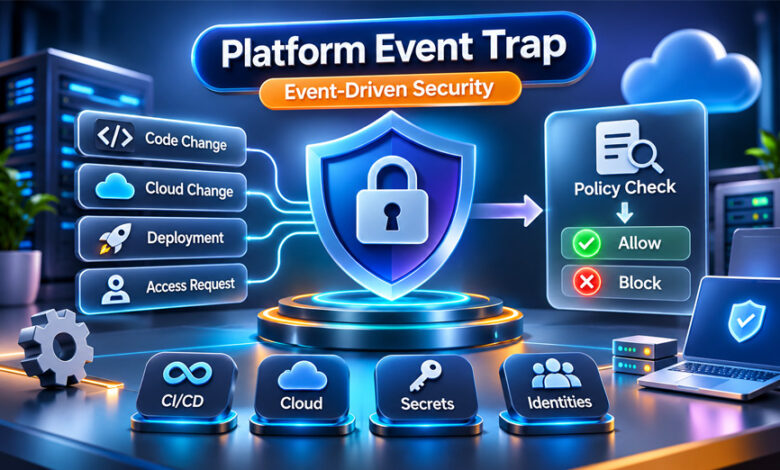

Platform Event Trap is an event-based security approach. It watches important actions in digital systems and checks them against security rules. If it finds a risky action, it can respond quickly.
This approach can be used in CI/CD pipelines, cloud systems, software repositories, and identity systems. It can help stop unsafe actions before they cause a bigger problem.
Platform Event Trap is not one specific software product or an official cybersecurity standard. This guide explains what it means, how it works, where it is used, and its main benefits and limits.
What Is a Platform Event Trap?
A Platform Event Trap is a security approach that connects an important system event with a security decision.
An event could be a new code change, deployment request, exposed API key, cloud setting change, or unusual account action.
The basic process is:
Event → Security Check → Decision → Response
When something happens, the system checks it against security rules. If everything is safe and allowed, the process continues. If a rule is broken, the system may stop or pause the action.
For example, it may block a code merge, stop a deployment, send an alert, ask for approval, or start another security action.
Platform Event Trap is not one program that companies install. Organizations can build this type of system by connecting security scanners, cloud services, repositories, policy engines, identity systems, and CI/CD tools.
It is also not an official NIST or OWASP security control. It is better understood as a security approach related to automated security, Policy-as-Code, DevSecOps, continuous monitoring, and Zero Trust.
How Does a Platform Event Trap Work?
The process starts when an event happens inside a monitored system.
For example, a developer may submit new code. A system may try to deploy an application. A service account may ask for special access. Someone may also change an important cloud setting.
An event listener or integration collects information about the action. The information is then checked by a security system or policy engine.
The policy engine checks whether the action follows the required rules. It may check permissions, approvals, software verification, or possible exposed credentials.
If everything is correct, the process continues.
If a rule is broken, the system may block the action, pause it for review, send an alert, or ask for extra approval.
Clear and serious problems are better suited to automatic blocking. If the problem is unclear, a security team may need to review it first.
The system should also keep a record of what happened. These records can help with security reviews and investigations.
Main Components of a Platform Event Trap
A Platform Event Trap normally needs several parts to work properly.
Event Source
The event source is where the activity happens.
It may be a Git repository, CI/CD pipeline, cloud service, identity system, security scanner, or deployment platform.
The event information needs to be accurate. Missing or incorrect information can lead to a wrong security decision.
Event Listener
The event listener notices and collects important activity.
Organizations may use webhooks, APIs, platform events, or security integrations for this job.
Not every event needs to be checked. Teams normally focus on actions that could affect security or important systems.
Detection and Policy Engine
This part checks whether an event creates a security problem.
For example, a scanner may find something that looks like an API key inside source code.
The policy engine then checks the event against security rules. These rules may cover permissions, approvals, credentials, software signatures, and infrastructure changes.
Rules need to be clear. A rule that is too strict may block safe activity. A weak rule may miss a real problem.
Enforcement Layer
The enforcement layer decides what action to take after finding a problem.
It may stop a build, reject a deployment, pause a process, ask for approval, or send the event to a security team.
The response should match the level of risk. A small or unclear problem does not always need a strong automatic action.
Audit Logging
Audit logs keep a record of what happened.
They can show which event happened, what rule was checked, why an action was blocked or allowed, and whether someone later changed the decision.
These records are useful for investigations and for improving security rules.
Common Events That Can Trigger a Platform Event Trap
Different security events can start an automatic response.
One common example is an exposed password, API key, or access token. A secret scanner may find it inside a code change. The system can then stop that code from moving forward until someone checks the problem.
Missing approvals can also trigger a response. A code change or production deployment may be stopped if it does not have the required approval.
Software checks are another example. A company may require software to pass certain checks before it reaches production. If the check fails, the release can be stopped.
Cloud changes can also create security events. For example, cloud storage may become public by mistake, a firewall setting may be changed, or an account may receive permissions it should not have.
The goal is not to block every unusual action. Automatic blocking works best when the security rule is clear and the risk is important.
Platform Event Trap in CI/CD Pipelines
CI/CD means Continuous Integration and Continuous Delivery or Deployment. These systems help automate software building, testing, and releases.
Automation makes development faster, but security problems can also move through the process quickly.
Platform Event Trap controls can add security checks at important stages.
When developers submit code, the system can check security scans and required approvals. During a build, it can look for exposed secrets and other security problems.
Before software reaches production, the system can check approvals and software verification. If an important check fails, deployment can be stopped.
CI/CD pipelines may have access to source code, credentials, cloud systems, software files, and production environments. This makes pipeline security important.
Event-based security supports DevSecOps by adding security checks directly into development and deployment processes.
Platform Event Trap and Secret Security
Modern software uses many types of credentials. These include passwords, API keys, access tokens, certificates, and signing credentials.
These secrets can sometimes appear by mistake in source code, logs, configuration files, container images, or software files.
A Platform Event Trap can connect secret scanning with a fast security response.
For example, a scanner may find a production API key in a code change. The system can stop the code from being merged while the key is checked.
Simply deleting the key from the latest code may not be enough. It may still exist in old repository history, logs, caches, or other files.
If a real credential may have been exposed, the organization may need to replace or disable it.
This approach can help teams respond faster. However, it cannot guarantee that an exposed credential was never copied or used.
Platform Event Trap and Cloud Security
Cloud systems change often. Companies create resources, update software, change permissions, and modify settings.
Some changes can create security risks.
For example, cloud storage could accidentally become public. A firewall setting could be changed without approval. An account could also receive too much access.
Event-based security can detect selected changes and check them against approved rules.
The system may send an alert, ask for review, block the action, or start a correction process.
Another issue is configuration drift. This happens when cloud settings move away from the approved setup.
Some systems can automatically return settings to an approved state. However, this needs careful testing because a wrong automatic change could interrupt a working service.
Platform Event Trap and Non-Human Identities
Not every digital account is controlled directly by a person.
Applications, bots, APIs, service accounts, CI/CD runners, and automated systems also need digital identities. These are often called non-human identities.
Some of these accounts have powerful permissions.
For example, a deployment account may have permission to change cloud infrastructure or access production systems.
A Platform Event Trap can check what these accounts are doing.
If a service account asks for permissions outside its normal role, the action may be paused or sent for review.
These accounts should also follow the least-privilege rule. This means they should only receive the permissions they actually need.
Platform Event Trap vs Traditional Security Monitoring
Traditional security monitoring mainly watches systems and creates alerts.
It collects information, finds unusual activity, and gives security teams details they can investigate.
A Platform Event Trap can go further by connecting an event directly with an action.
For example, normal monitoring may warn that a deployment does not have approval. An event-driven control may actually stop that deployment.
However, not every alert should cause an automatic block. Some problems need human review.
For this reason, monitoring and automated enforcement can work together.
Platform Event Trap vs Webhooks, SIEM, SOAR, and Policy-as-Code
Platform Event Trap is related to several security technologies, but they are not the same thing.
A webhook tells another system when an event happens.
A SIEM collects and studies security information from different systems.
A SOAR platform helps connect security tools and automate security response processes.
Policy-as-Code means writing security rules in a format that software can automatically check.
These technologies can work together as part of an event-driven security system.
The basic idea remains:
Event → Decision → Action
Benefits of Platform Event Traps
Speed is one of the main benefits. A system can respond to a clear security problem without waiting for someone to manually notice an alert.
This can stop some unsafe actions before they move further. For example, an unsafe deployment can be blocked before reaching production.
Consistency is another benefit. The same security rules can be applied each time an event happens.
Good audit records are also useful. They can show what happened, what decision was made, and what action followed.
Event-driven security can also help teams respond faster to possible credential leaks.
However, it cannot stop every cyberattack or security problem. Its success depends on good rules, accurate event information, secure integrations, and regular maintenance.
Limitations and Risks of Platform Event Traps
Automated security can act quickly, but wrong decisions can also cause problems.
False Positives and False Negatives
A false positive happens when safe activity is wrongly marked as dangerous.
For example, a bad rule may stop a safe software release.
A false negative happens when a real security problem is missed.
Security rules therefore need regular testing and updates.
Workflow Disruption
Automatic actions can sometimes interrupt normal work.
Stopping the wrong deployment may delay a release. Disabling the wrong credential could stop an application from working. An incorrect cloud rollback could affect a live service.
High-impact actions should therefore be tested carefully.
Integration and Visibility Problems
Platform Event Traps depend on other systems.
An event may arrive late. An integration may stop working. Permissions may change. Some important activity may not be visible to the security system.
A security control cannot respond to an event it does not detect.
Teams should therefore also monitor whether their security integrations are working correctly.
Fail-Open vs Fail-Closed
A fail-open system allows an action to continue if the security check cannot finish.
This can keep services running, but it may allow risky activity.
A fail-closed system stops the action until the security check works.
This can provide stronger protection, but it may also stop legitimate work during a technical problem.
The right choice depends on the system and the level of risk.
How to Implement a Platform Event Trap Safely
Start with a clear security problem.
Good examples include exposed production credentials, unauthorized deployments, failed software checks, and risky infrastructure changes.
Next, create clear rules explaining what is allowed and what should be stopped or reviewed.
The response should match the risk. Not every problem needs a strong automatic action.
One useful method is to start in Observe or Audit Mode. The system records what it would block without actually stopping anything.
Teams can then check the results and fix rules that create too many false alerts.
Once the rules are reliable, automatic enforcement can be introduced slowly.
The security automation should also use least-privilege access. It should only have the permissions needed to perform its job.
Teams should also test what happens when an integration or security system stops working.
Platform Event Trap Best Practices
Use reliable event sources and keep security rules clear.
Test new rules before allowing them to block important work.
Give automated security systems only the permissions they need.
Keep useful audit logs so teams can understand why an action was allowed or stopped.
Organizations should also decide who can override an automatic security decision. Any override should be recorded and reviewed.
Security policies should be checked regularly because software, cloud systems, and business needs change.
Human review should remain available for unclear events and high-risk actions.
When Should an Organization Use Platform Event Traps?
Not every security event needs an automatic response.
Platform Event Traps are most useful when the possible damage is serious, the rule is clear, and the event can be detected reliably.
They may be useful for companies with important CI/CD pipelines, fast-changing cloud systems, sensitive credentials, many machine identities, or strict software release rules.
A useful question is:
Would the problem become much worse if nobody responded quickly?
If yes, an automatic response may be useful.
However, unclear situations may be better handled by sending an alert to a security team for review.
Platform Event Traps and Cybersecurity Frameworks
Platform Event Trap is not an official NIST or OWASP security control.
However, its ideas are related to established cybersecurity practices.
The NIST Cybersecurity Framework 2.0 covers areas such as security governance, detection, response, and recovery.
NIST SP 800-53 Rev. 5 includes controls related to system monitoring and security response.
The NIST Secure Software Development Framework (SSDF) provides guidance for making software development more secure.
Zero Trust is also related. It means systems should not automatically trust an action just because it comes from a familiar network, user, or system.
OWASP also provides useful guidance about application security, credentials, identities, and software supply-chain risks.
These frameworks can help organizations build better security controls. However, they do not require a specific control called Platform Event Trap.
Future of Event-Driven Security
Software development and cloud systems are becoming more automated.
Applications, APIs, cloud services, CI/CD pipelines, and machine identities can perform many actions without a person doing each step manually.
This makes fast security checks more useful.
Policy-as-Code can help companies create rules that automated systems can check. Cloud platforms can also provide useful events for security systems.
Future security systems may use more information when making decisions, such as who performed an action, what resource was changed, and how risky the action may be.
AI may also help security teams study and prioritize events. However, AI is not a required part of a Platform Event Trap.
Human review will still be important, especially when a situation is unclear or an automatic action could cause a major problem.
Bottom Line
Platform Event Trap is a term for an event-based cybersecurity approach. It connects important system events with security rules and possible actions.
The basic process is:
Event → Policy → Decision → Action
It can be useful for CI/CD security, cloud systems, credential protection, and machine identities.
Its main benefit is faster security response. However, bad rules, false alerts, failed integrations, and incorrect automatic actions can create problems.
A good system needs reliable information, clear rules, careful testing, limited permissions, audit logs, and human review.
Most importantly, Platform Event Trap is a security approach. It is not one specific product or an official cybersecurity standard.
Frequently Asked Questions
What does Platform Event Trap mean?
Platform Event Trap is an event-based security approach. It checks important system events against security rules and can take action when it finds a risk.
Is Platform Event Trap an official cybersecurity standard?
No. It is not an official NIST or OWASP standard. It is a term used to describe an event-driven security approach.
How does a Platform Event Trap work?
It detects an event, checks security rules, makes a decision, and then allows, blocks, pauses, or reports the action.
What is an example of a Platform Event Trap?
A scanner may find an API key inside new code. The system can stop the code from being merged until the key is checked and secured.
Can Platform Event Traps protect CI/CD pipelines?
Yes, they can help check code, security scans, approvals, builds, and deployments before allowing the pipeline to continue.
Can a Platform Event Trap stop secret leaks?
It can help find and limit some leaks, but it cannot guarantee that an exposed password or key was never copied or used.
Is Platform Event Trap the same as security monitoring?
No. Monitoring mainly watches activity and sends alerts. A Platform Event Trap can also connect an event directly with a security action.
What are the main risks of Platform Event Traps?
The main risks are false alerts, missed threats, bad security rules, integration problems, and automatic actions that interrupt normal work.